Enter Password
Customer Agent Tester
Designed an end-to-end testing environment for users to observe and refine their Customer Agent, improving quality and performance while reducing deployment risk.
Role: Senior Product Designer I
Company: HubSpot
Timeline: April 2025 - September 2025
What's HubSpot and the Breeze Customer Agent?
HubSpot is a B2B SaaS platform that provides CRM, marketing, sales, and customer service software within a shared data infrastructure. Its products are organized into “Hubs” (Marketing, Sales, Service, etc.) that operate on a common CRM and customer data model.
My work took place within Service Hub (and later, the AI group) on the Breeze Customer Agent, HubSpot’s flagship AI-powered customer support agent. The Breeze Customer Agent uses CRM data and connected knowledge sources to generate responses to customer questions, qualify inquiries, and route conversations to human agents when necessary. It is available to Professional and Enterprise customers, operates on a usage-based credit system, and can be deployed across multiple channels, like live chat, email, and calling.
Who uses the Breeze Customer Agent?
There are three groups of users the Breeze Customer Agent is targeted at. While it originally started as a customer support agent, the use cases have grown to cover marketing and sales.
Customer service
The Breeze Customer Agent is designed for customer service teams managing high volumes of support inquiries who want to scale their support without increasing headcount. It’s especially valuable for teams looking to provide reliable 24/7 coverage, and reduce ticket backlogs. By automatically handling routine questions and escalating more complex issues to human agents when needed, it helps teams operate more efficiently while maintaining a high-quality support experience.
Marketing
The Breeze Customer Agent is also designed for marketing teams looking to engage website visitors in real time and convert interest into action. It helps answer common questions about events, pricing, webinars, and subscriptions, ensuring visitors get the information they need instantly. By qualifying prospects and guiding them to relevant content, the agent supports turning anonymous traffic into high-quality leads while creating a more responsive and personalized marketing experience.
Sales
The Breeze Customer Agent is also built for sales teams that need to respond quickly to prospect questions about products, pricing, and trials. It engages visitors in real time, helping qualify leads, book meetings, and accelerate the buying process. By leveraging CRM data to tailor conversations, the agent ensures interactions are relevant and personalized, allowing sales teams to move prospects forward more efficiently.
Overview
The problem
Users were reluctant to deploy their Customer Agent, wary of the inherent risks of putting AI in front of their customers.
The opportunity
Create an environment where users could test, refine, and understand their Customer Agent, improving its performance and giving them the confidence to deploy.
User goals
Confirm the agent is behaving correctly before going live.
Refine responses and behavior in a fast, iterative workflow.
Understand how and why the agent produces certain outputs.
Ensure the full system (responses, handoffs, actions) is properly configured.
Move from cautious testing to confident, broader deployment.
Business goals
Remove friction between setup and deployment to increase adoption.
Accelerate time to value by enabling faster, more reliable iteration.
Support ongoing feature expansion without increasing complexity for users.
Drive AI credit consumption through increased and sustained usage across Professional and Enterprise customers.
The solution
To address this gap, we designed the Customer Agent Tester, an environment built to scale alongside the Customer Agent, bringing together new and existing workflows users need to evaluate and refine their agent, surfacing agent reasoning, and reducing the risk of deploying an AI agent to their customers.
Solution preview
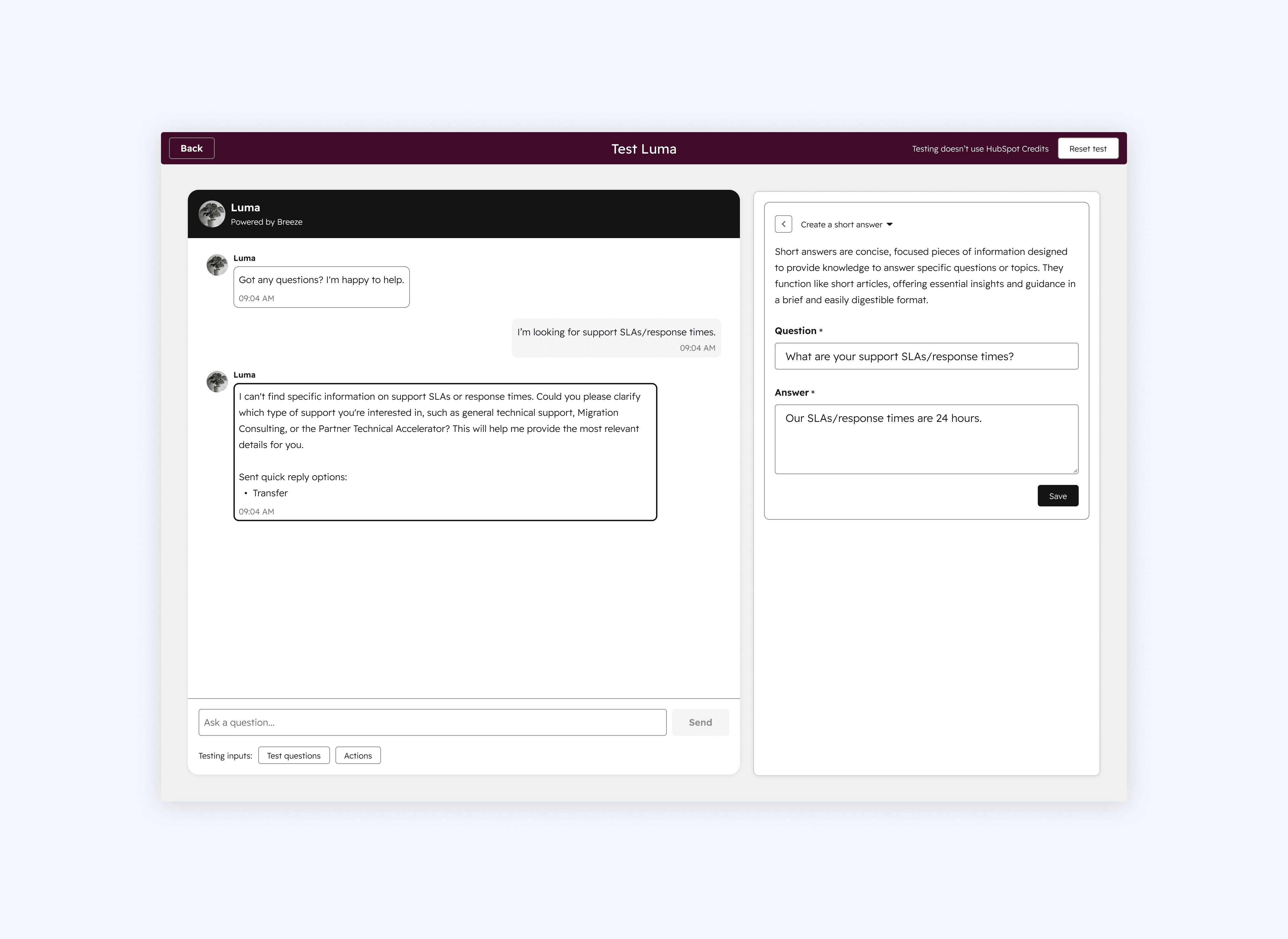
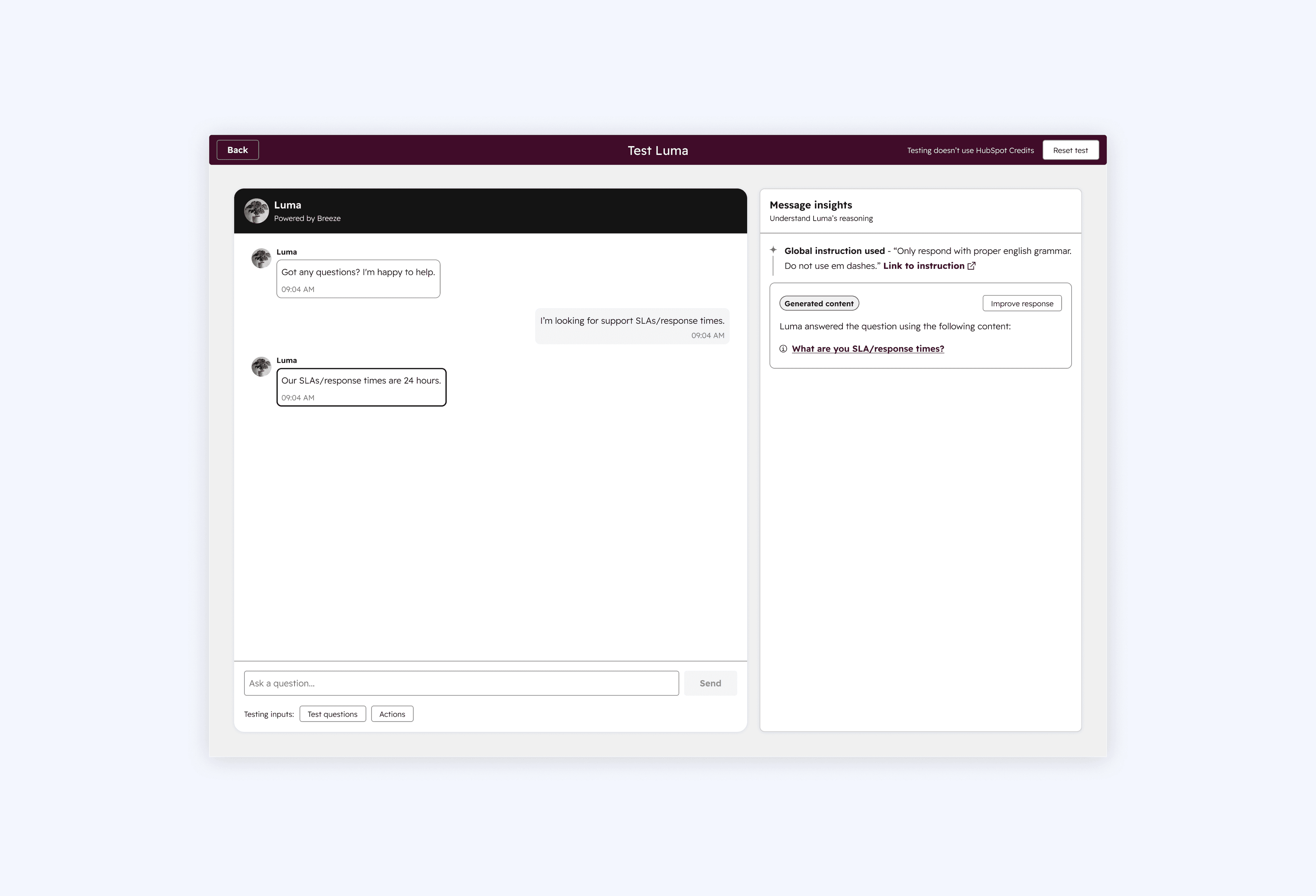
The Customer Agent Tester consists of two interconnected panels. Users interact with their Customer Agent through a chat interface on the left hand side that mirrors the end customer experience. Clicking into the agent's response shows the message insights in the right hand panel. The user can view cited sources, fix responses the agent couldn't generate, fine-tune existing ones, or even edit and add handoff triggers, all without leaving the experience.
Process
Getting our bearings
With a newly formed team and a brand new mission, the first challenge was simply figuring out where to begin. There was no established roadmap and no prior work to build off of.
User research
To help guide our direction, we interviewed early adopters about why they decided to actually deploy their Customer Agent. We wanted to understand their thinking, what factors mattered most to them, and any hesitations they had before going live.
AI and early designs
Armed with our research and key takeaways, we jumped into early design concepts, using AI as our jumping off point and iterating from there.
Feedback and iterations
We refined the designs through iterative feedback from users and stakeholders.
Trellis & UX updates
We updated the designs using our new design system, Trellis, and adjusted the UX.
Solution
The final solution for this phase, ready for launch at Inbound 2025.
Getting our bearings
Team & timeline
The Customer Agent Coaching team was made up of nine people across design, product, and engineering. I led the design work as the Senior Product Designer, partnering closely with a Senior Product Manager, a Front-End Engineering Lead, and a Back-End Tech Lead. There were also two Front-End Senior Software Engineer Is, a Front-End Senior Software Engineer II, and two Back-End Senior Software Engineer IIs. The project ran from April (when the team switched to the coaching mission) to September 2025, just in time for HubSpot's Inbound event.
Customer Agent coaching mission
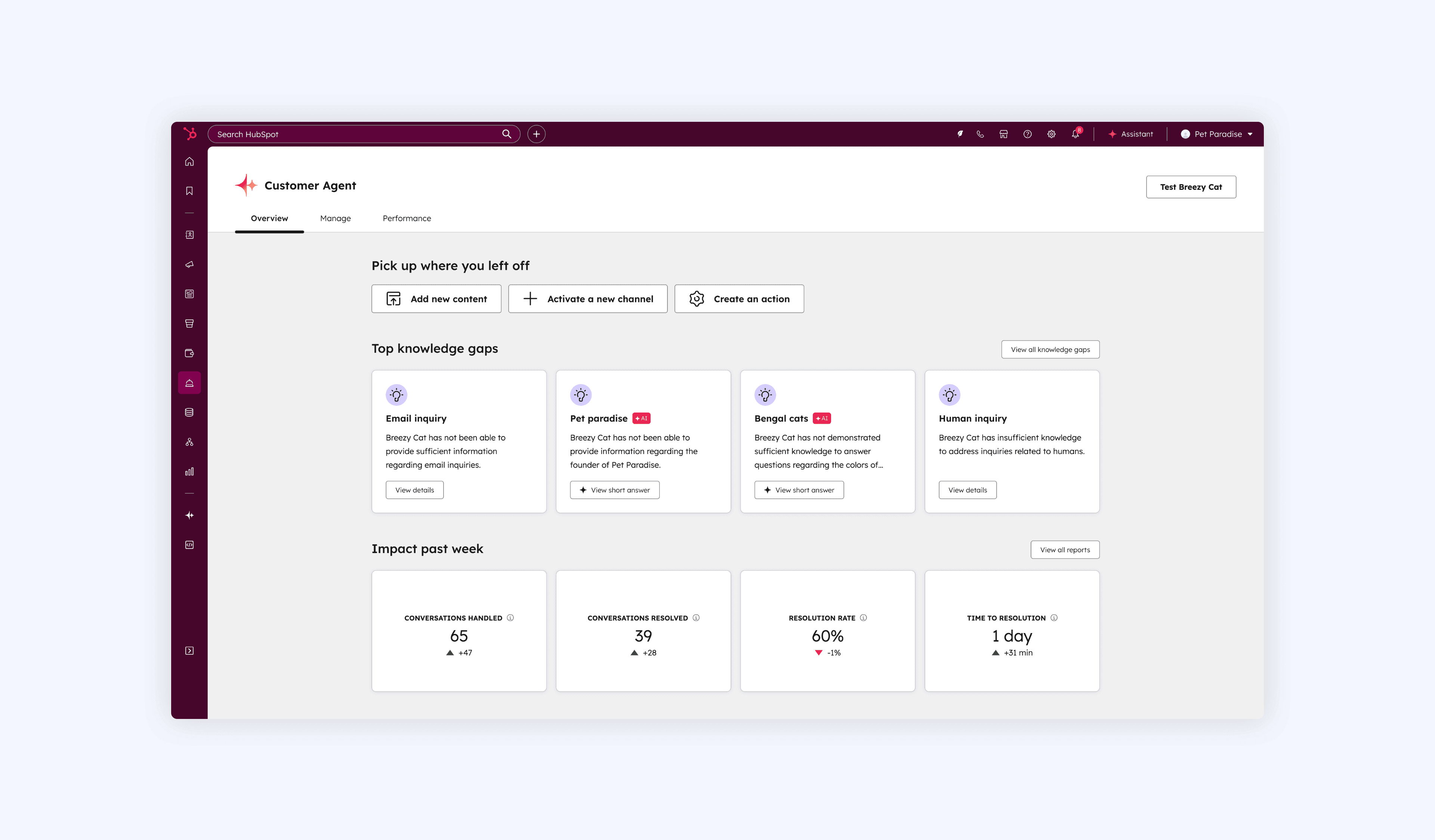
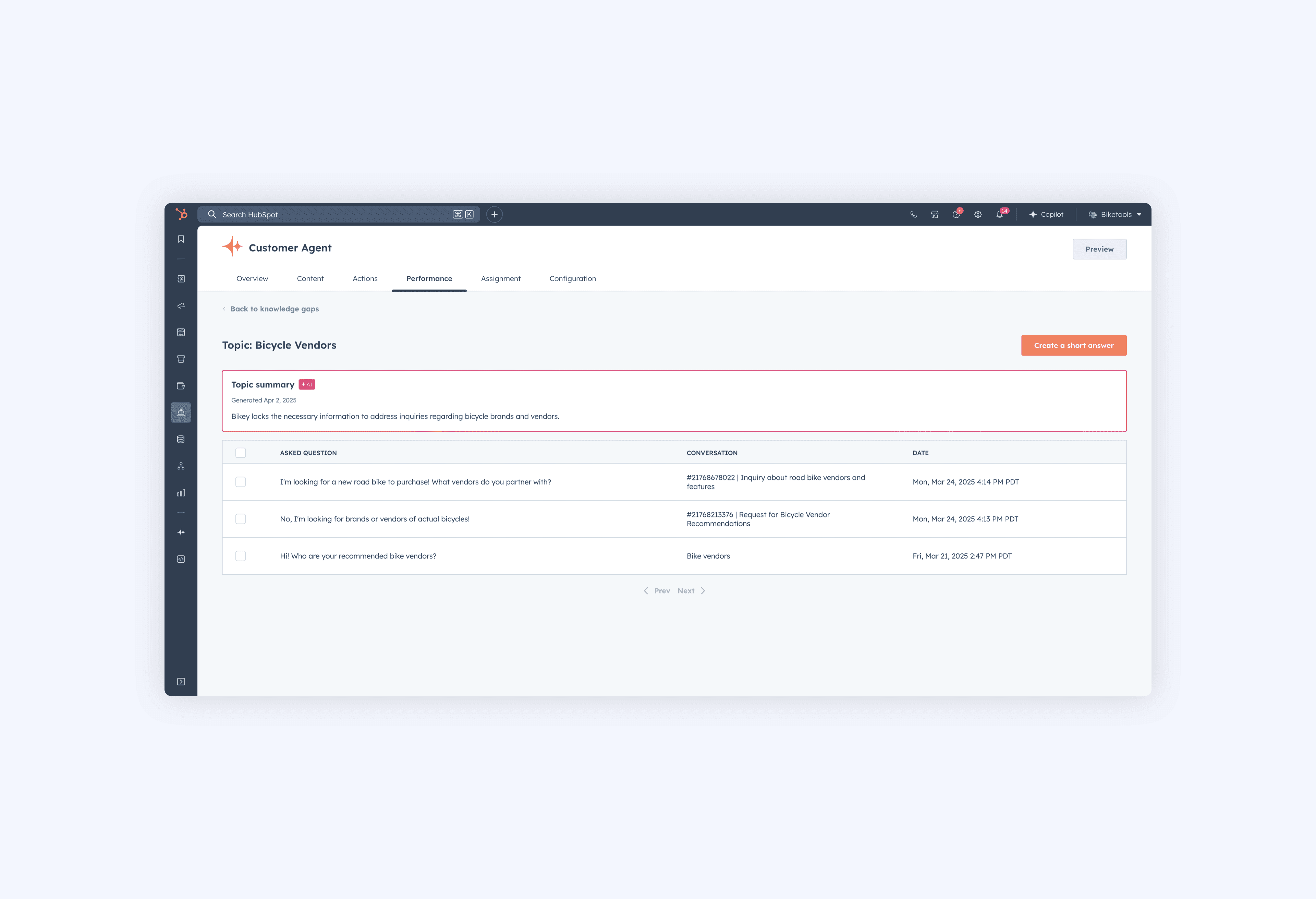
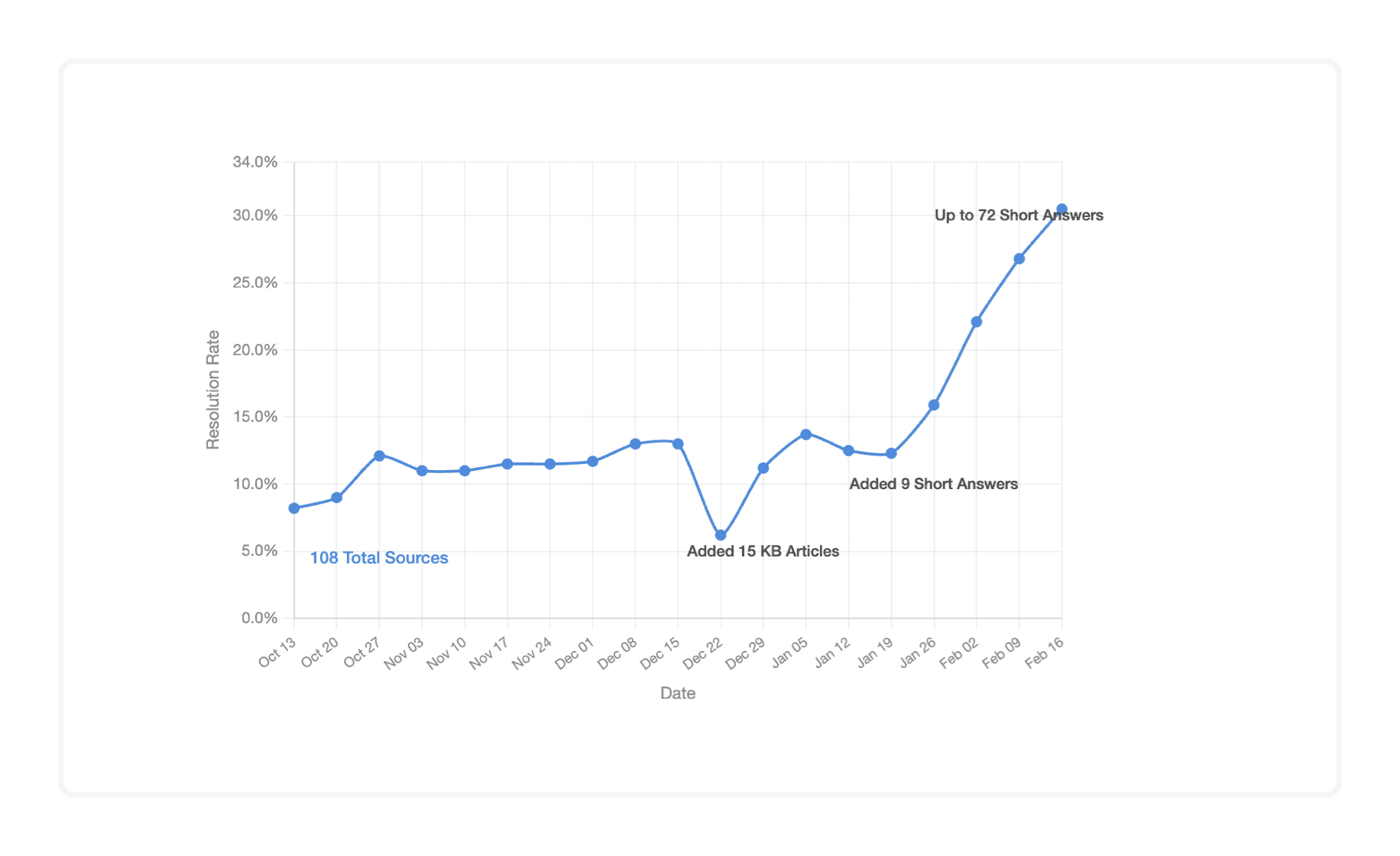
While the Customer Agent was growing in capability, performance was beginning to plateau. Admins really only had one tool to correct the Customer Agent, called "Knowledge Gaps," which appeared when the Customer Agent replied with, "I don't know," to a customer's question. Knowledge Gaps are grouped by topic (see screenshot below) so the admin can view all similar questions and then create a short answer to resolve the Knowledge Gap. Short answers are a unique type of content source for the Customer Agent, they act like mini-articles but aren't part of the larger HubSpot knowledge base system (more on that in my conclusion). They're more so a quick way to fill in missing information into your Customer Agent but will be used anytime a customer has a question that triggered the Knowledge Gap. Knowledge Gaps and short answers were very promising (see graph below) as their introduction led to higher resolution rates.
But other than Knowledge Gaps, admins had no other way to correct different types of mistakes or reinforce positive Customer Agent behavior, they only scratched the surface. Missed actions, wrong decisions, off-brand tone, positive actions worth replicating, none of that was being captured. Without a richer feedback loop, the Customer Agent would continue to struggle to improve and earn user trust quickly. On top of that, identifying problems meant manually sifting through hundreds of conversations, making the process slow and difficult to track. Without more visibility into why the agent responded a certain way or any way to fix it, trust in the AI was eroding. This became the core mission of the Customer Agent coaching team: give admins the tools to understand, correct, and improve their agent's performance.
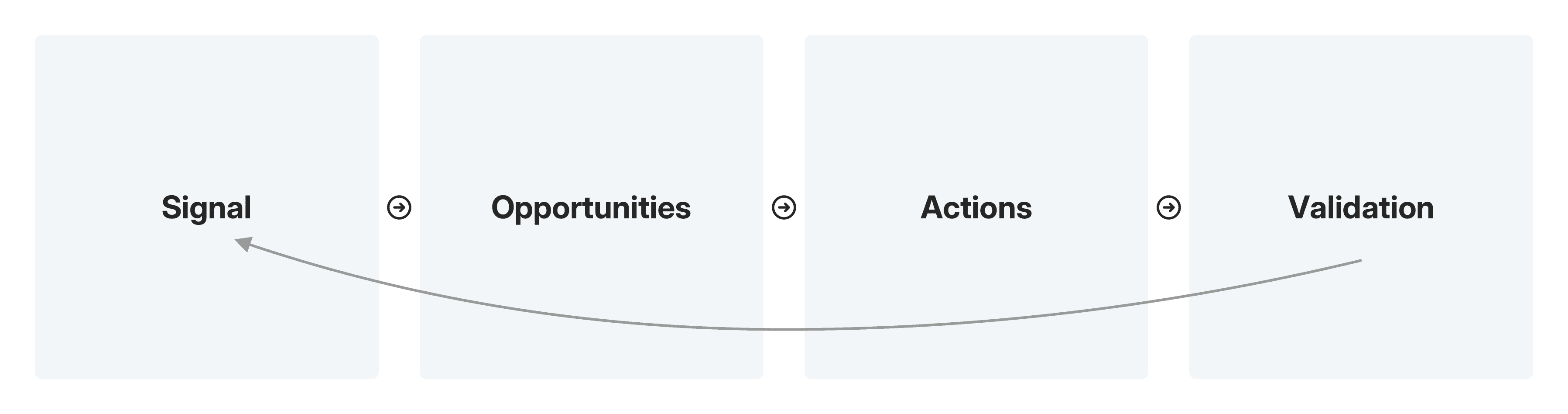
Introducing the Customer Agent Coaching Loop! This is a feedback system designed to ensure the agent continuously improves over time. The loop is built around four stages. It starts with signals which are patterns in behavior or system responses that indicate coaching is needed. Things like user frustration, knowledge gaps, execution failures, and manual flags from human reviewers. Those signals then surface opportunities, which are clear gaps in the agent's behavior, decisions, or use of knowledge that negatively impacted a conversation. From there, admins can take targeted actions to address those gaps, whether that's improving knowledge, refining response design, adjusting actions and capabilities, or fixing process issues. Finally, validation ensures that those coaching actions actually worked, that the agent improved without introducing new problems, and that what goes live reflects the intended experience.
Customer Agent product group goals
But two important questions I always like to ask are why this and why now?
The Customer Agent product group had two goals for 2025, a 60% average resolution rate and 15,000 weekly active users by the end of the year. By March 2025, we had already reached an average resolution rate of 60%, which was a great sign. But weekly active users told a very different story, sitting at just 1,000 out of 15,000.
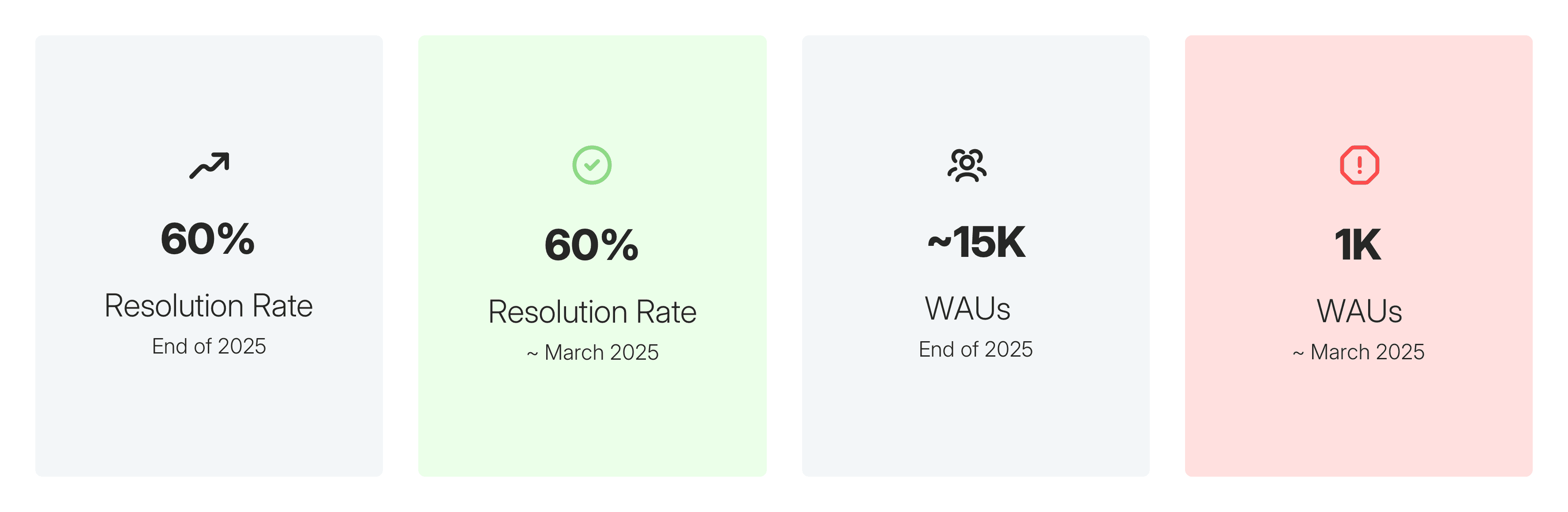
Did it make sense to tackle the Customer Agent coaching feedback loop given the product group's goals? The main metric our team would impact is the resolution rate which was plateauing but still in a very good place compared to activation. Plus, a lot of the capabilities needed to really push our mission forward were still a ways away and would take some time to materialize. And given the date for Inbound was fast approaching…my product manager and I both agreed that we needed to focus on the needs of non-activated users.
But why such low activation?
We already had some ideas on why activation was so low, we had heard them while working on the Growth mission. We knew users weren't adopting the Customer Agent because it didn't quite yet fit their workflows and many features were missing. It was limited to live chat, with no email or calling support, and lacked the customization tools needed to handle real-world scenarios, like specific instructions for tone or better built-out actions. But was there another reason and could the Customer Agent coaching team help?
User research
Four core values
Our user research revealed four core values that are very important for Customer Service users and the use of AI: cost and efficiency, speed and consistency, scale, and the human agent experience. On the cost and efficiency side, AI agents reduce operational costs by handling high volumes of conversations without adding headcount and remain available around the clock. Speed and consistency also emerged as a key factor with admins valuing instant responses with no hold times or queues, answers that stay on-script regardless of who is asking, and a system that never has bad days or needs retraining. At scale, the AI agents can manage thousands of simultaneous conversations and deploy seamlessly across live chat, email, calling, and SMS channels. Finally, for the human agent experience, AI frees them from repetitive, low-value tickets so they can focus their expertise on more complex and challenging situations that actually need a human touch.
The three R's
Our research also surfaced three themes, risk, refinement, and reasoning or what I call the "the three R's," that were causing hesitation and preventing teams from fully activating their Customer Agent.
Risk: Companies, especially those in regulated industries like healthcare, hesitate to deploy because a wrong, off-brand, or mishandled answer carries real consequences.
Refinement: Even when teams previewed their agent, our experience made it difficult to actually fix any mistakes that were found. It was sometimes easier for users to deploy their Customer Agent and let it make mistakes in the wild and then use our Knowledge Gaps feature to make adjustments. Mind blowing 🤯, I know.
Reasoning: Users had come to expect transparency into how and why their Customer Agent reached its answers. Without the visibility into the agent's line of thinking, where assumptions were made, and where things broke down, trust was hard to build.
Together, these three themes formed a clear design direction: we needed to make deployment feel safer, allow for intuitive refinement, and surface agent reasoning.
AI and early designs
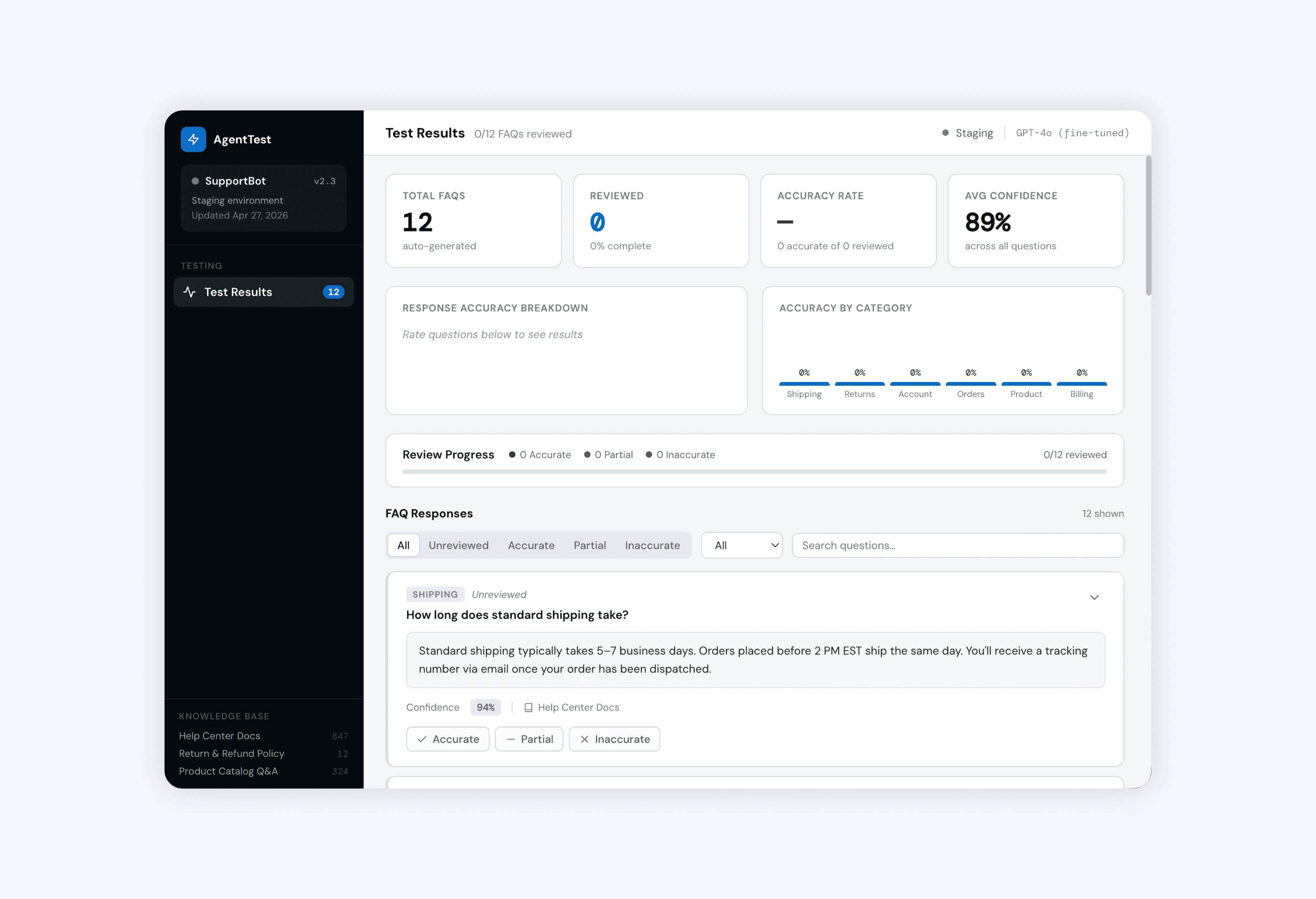
Taking inspiration from the Lovable design, we looked at the metrics and found ways to incorporate them into the experience. A key focus was making it easy for users to get started quickly, so we leaned into FAQs as a way to let them jump in. We explored adding reasoning to each agents response as well. We also played around with naming this new experience the "Training Center" where all the different coaching opportunities would live.
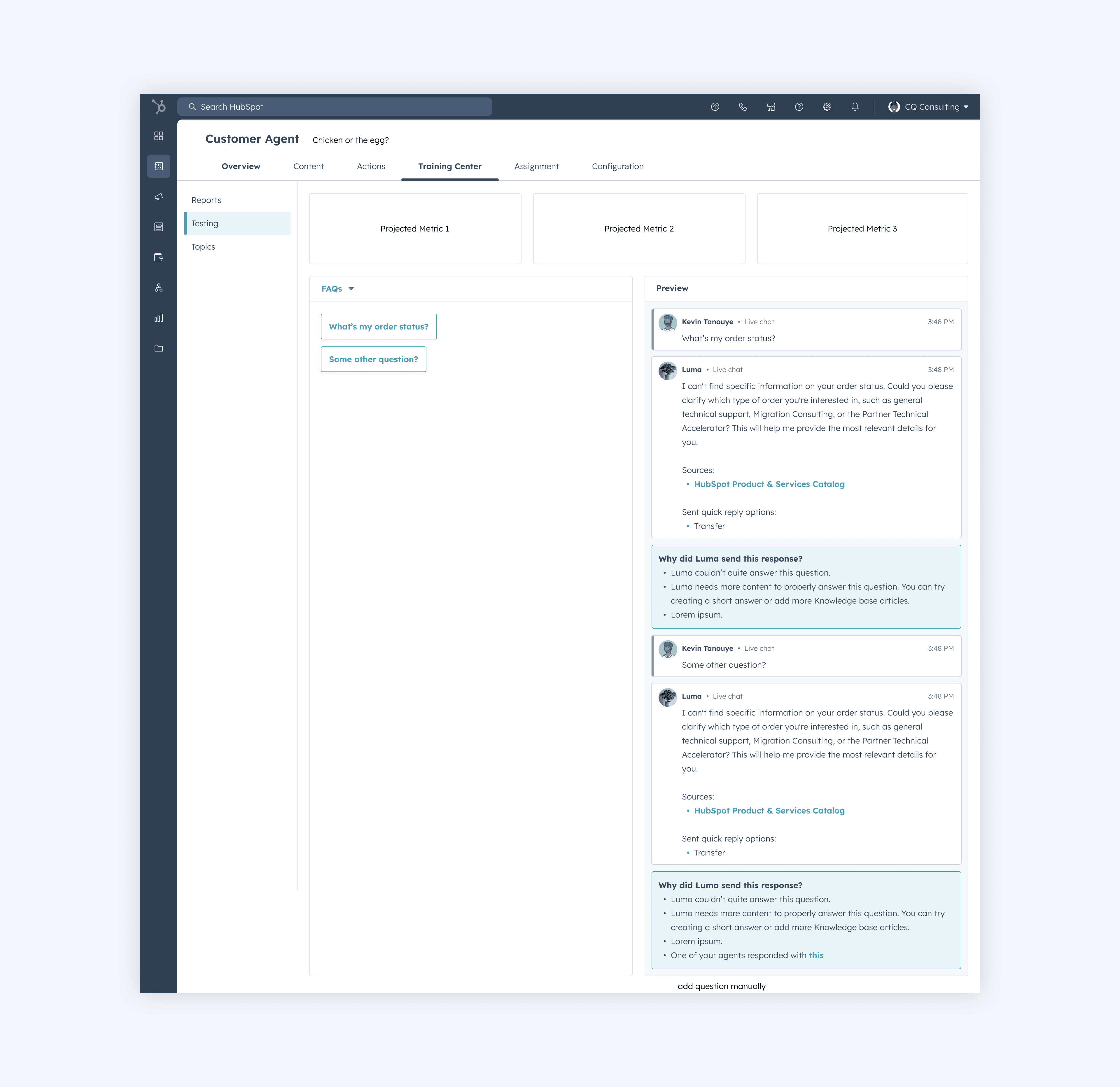
We decided to move away from the metrics, questioning what they would actually mean to users and whether they would reflect anything meaningful. The design shifted to center around chat as the primary interaction rather than users clicking through FAQs because users would want to ask their agent all sorts of questions. We doubled down on reasoning, making it clearer why the agent responded a certain way and surfacing a rating alongside each answer. This also sparked early thinking around how users could refine and improve responses over time.
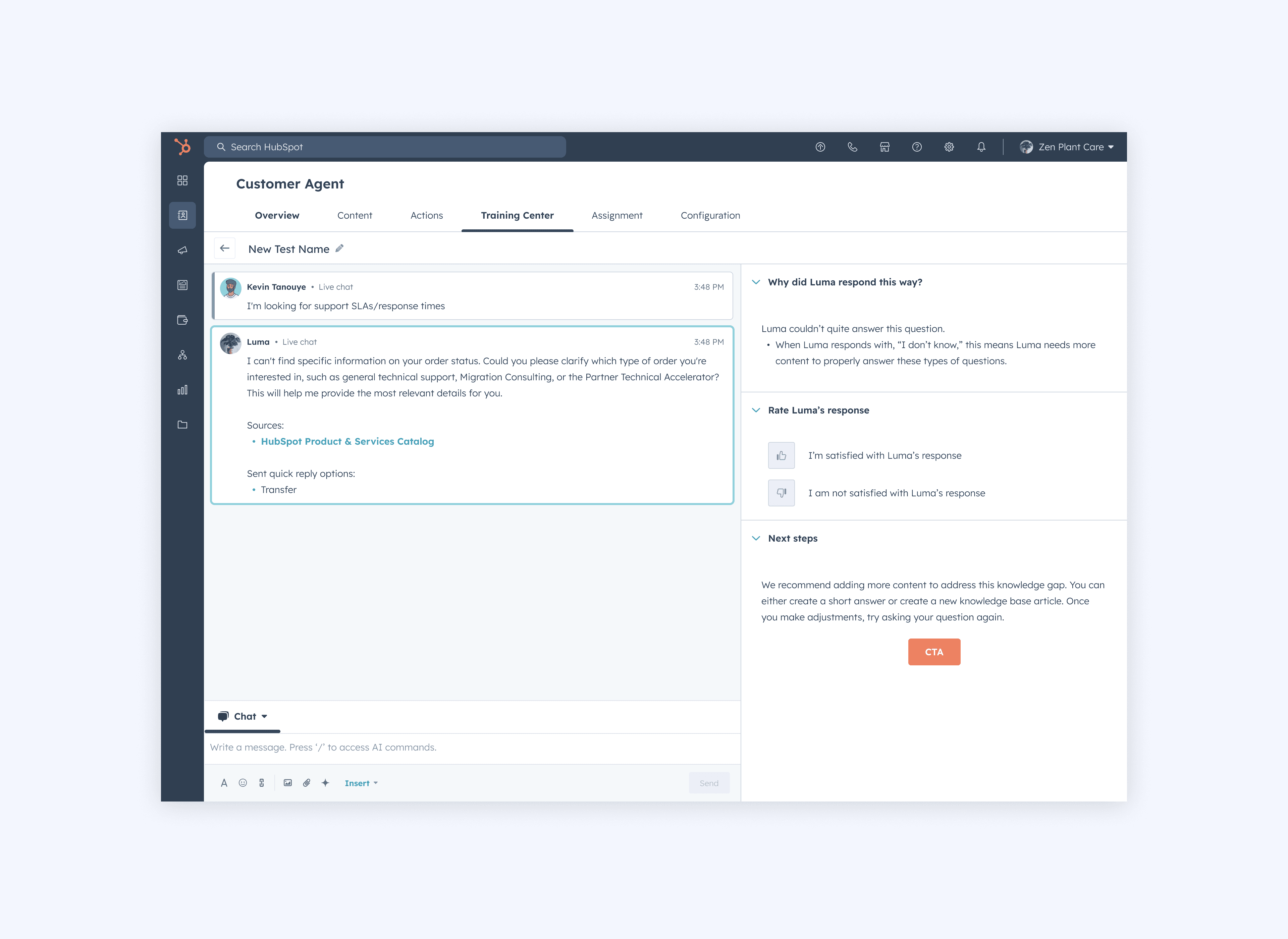
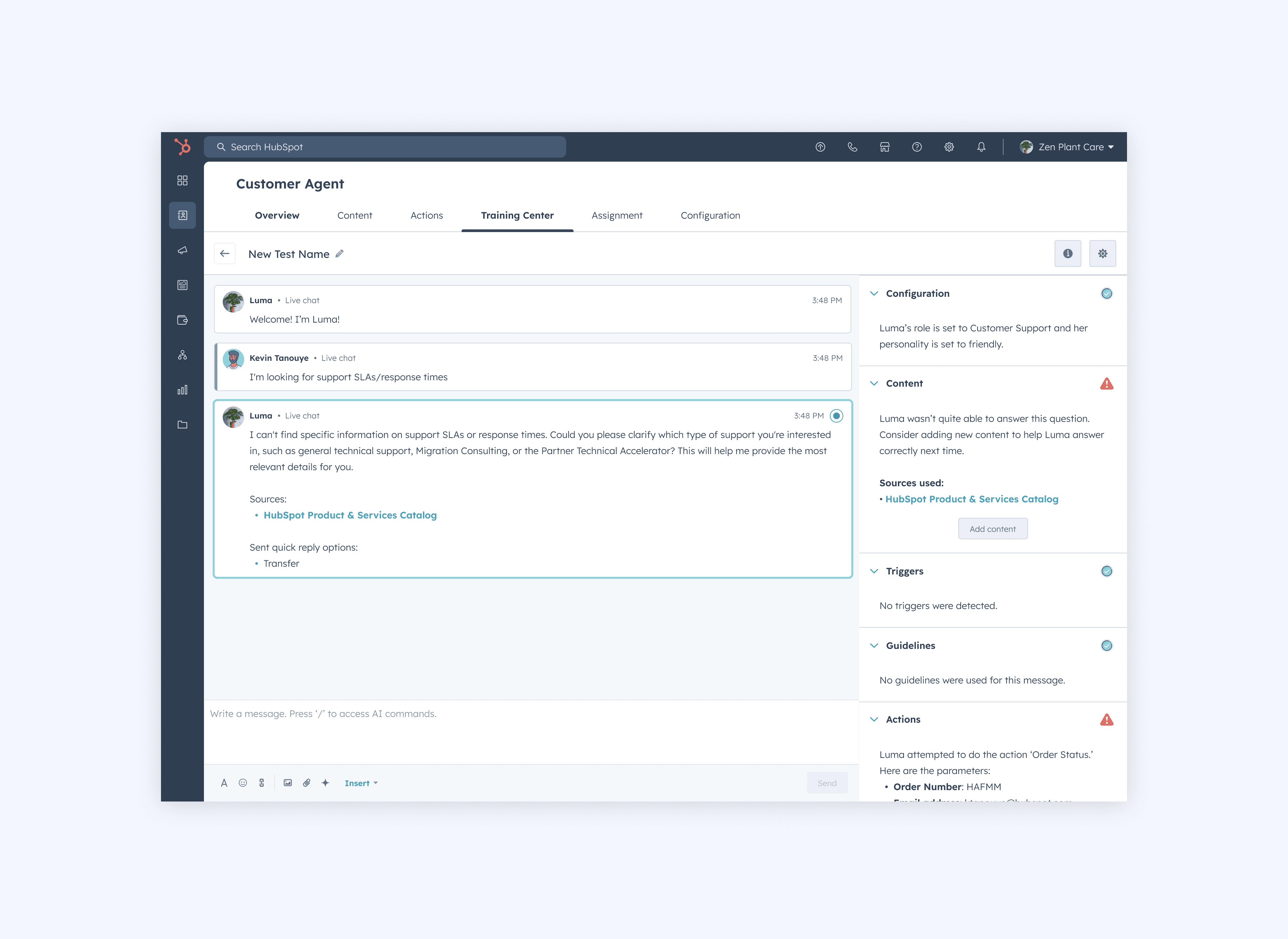
For the next iteration, I explored an idea where users could run multiple tests in parallel, thinking back to the different types of users we might have testing the Customer Agent. I also started mapping out all the different information we could surface as the Customer Agent gained more functionality, thinking ahead to what insights would matter most at scale. A core part of this was giving users visibility into where the agent was breaking down and where issues were arising but I was still working through how that visibility would connect back to actual refinement actions. One interaction I landed on was letting users select an individual message to drill into the insights behind it which was represented by the radio button. I would flip flop on this interaction as I continued designing, should we only show one message's insights at a time or all the insights at a time, like an audit log of sorts?
Feedback and iterations
At this point, "Training Center" wasn't quite resonating with users as a name or concept, and separately, a broader design leadership initiative called "Skymap" was prompting a full rethink of the main Customer Agent app. Rather than patch around these constraints, we took the opportunity to move to a full-page experience and make it accessible from anywhere in the app versus just on a specific tab. As part of this phase, I re-incorporated FAQs and continued developing how users could refine individual agent responses directly. Feedback from a fellow designer also pushed the interaction model toward the audit log idea. Rather than having users select a specific message to reveal insights, we would show a timeline view with a chronological read of all the agent's behavior, making it easier to spot patterns and understand issues in context.
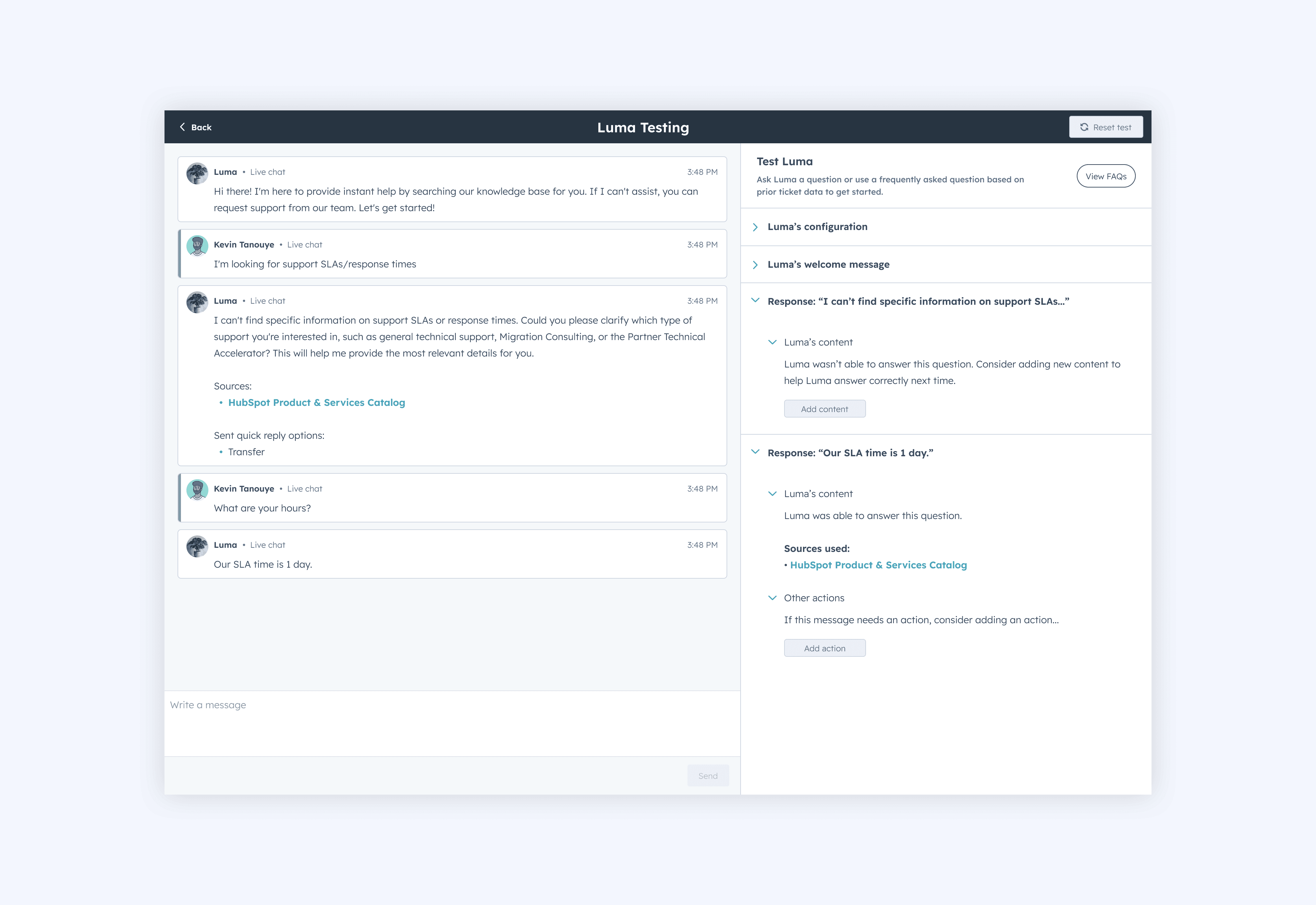
At this point in the design process, I started moving away from Help Desk components which had been driving the earlier designs. Our newer design system was leaning into a card-based style, so I took the opportunity to start exploring what that could look like here and began playing around with how that approach could work for the audit log.
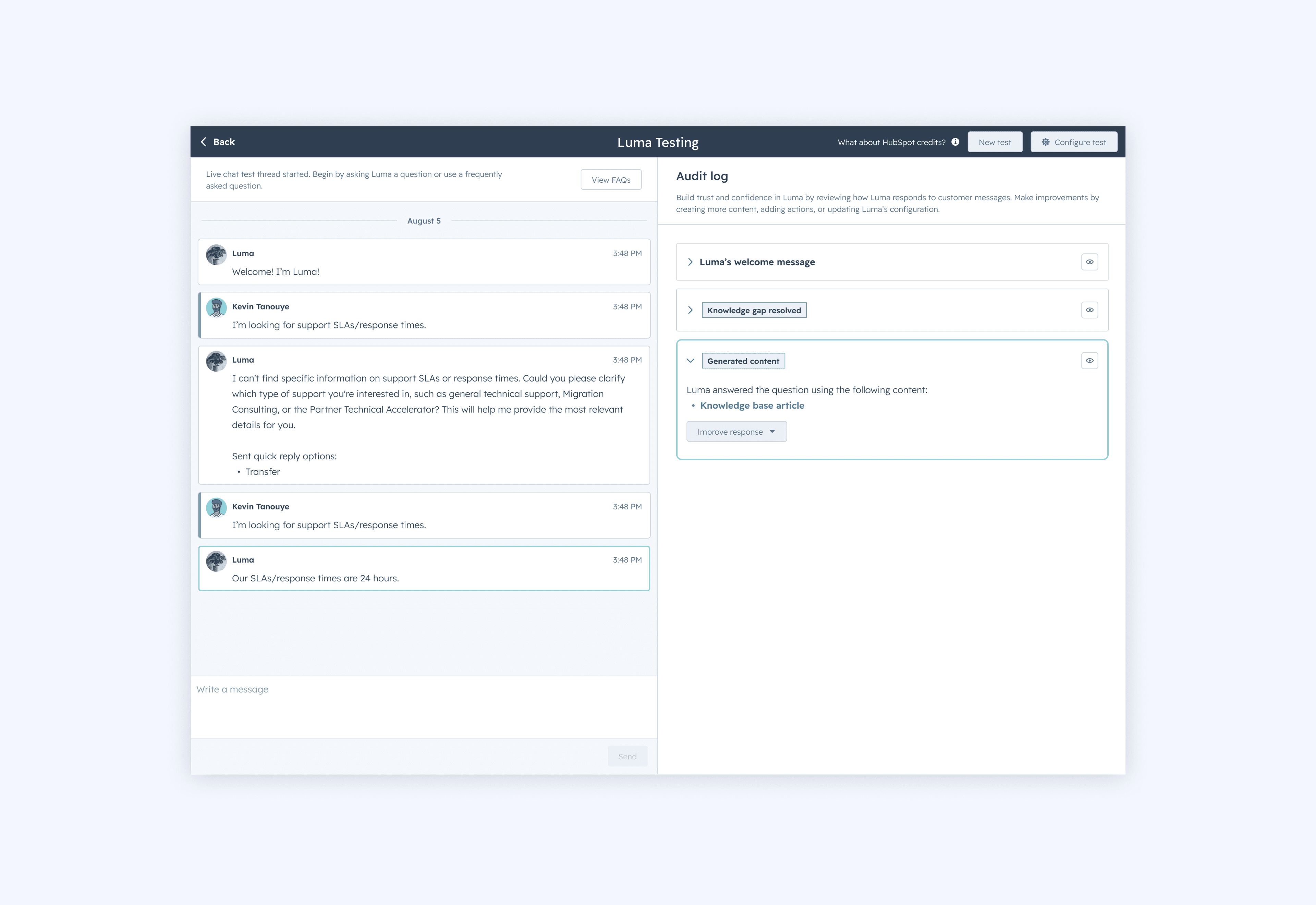
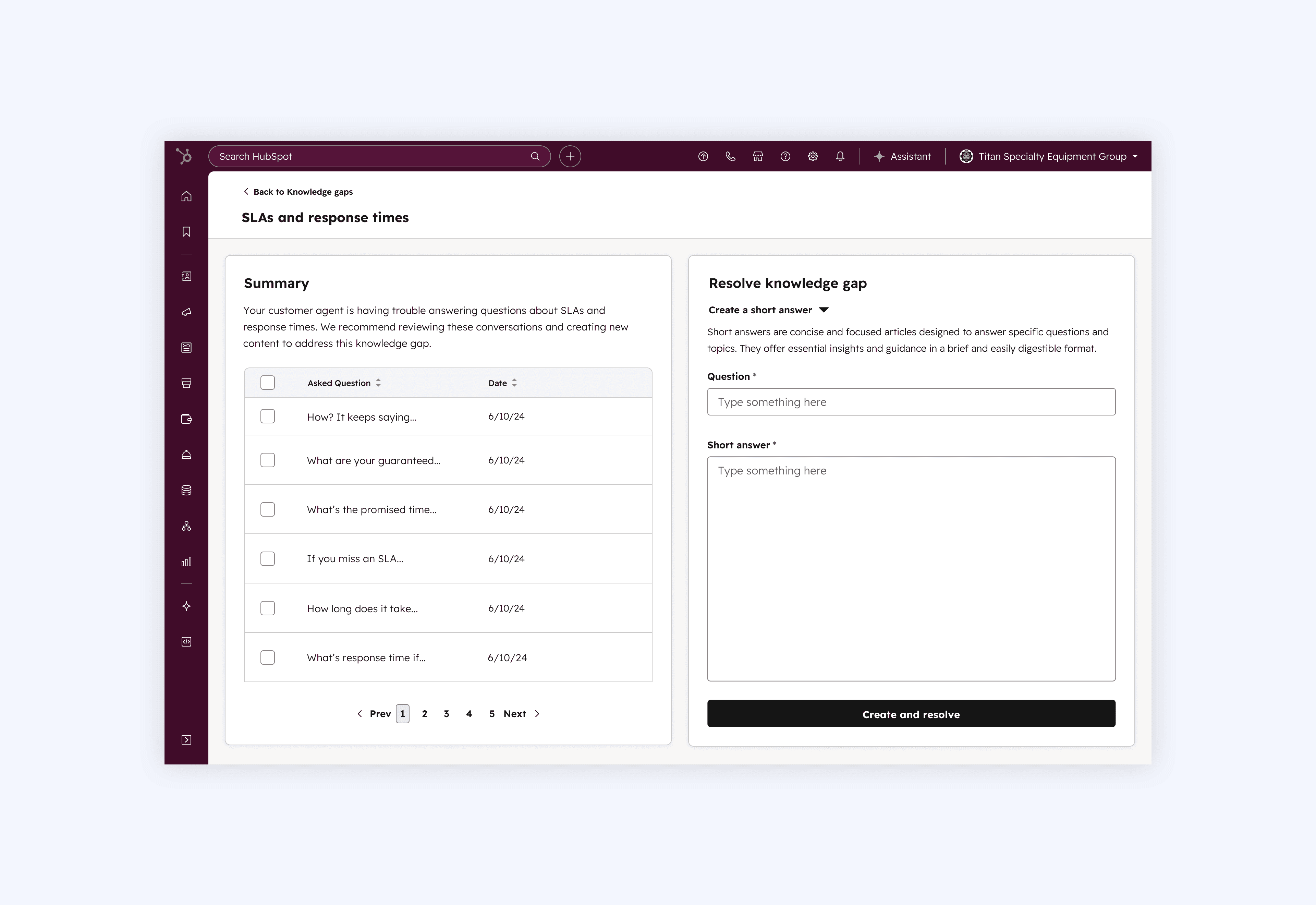
This design focused on how to incorporate resolving Knowledge Gaps directly into the tester. Up until this point, addressing Knowledge Gaps was purely a post-deployment feature. This is why some users found it easier to refine their agent by deploying it first. But we wanted to make refinement part of the testing process so users could start thinking about and resolving those gaps before ever going live. This would increase their trust and reduce the risk in deploying their Customer Agent.
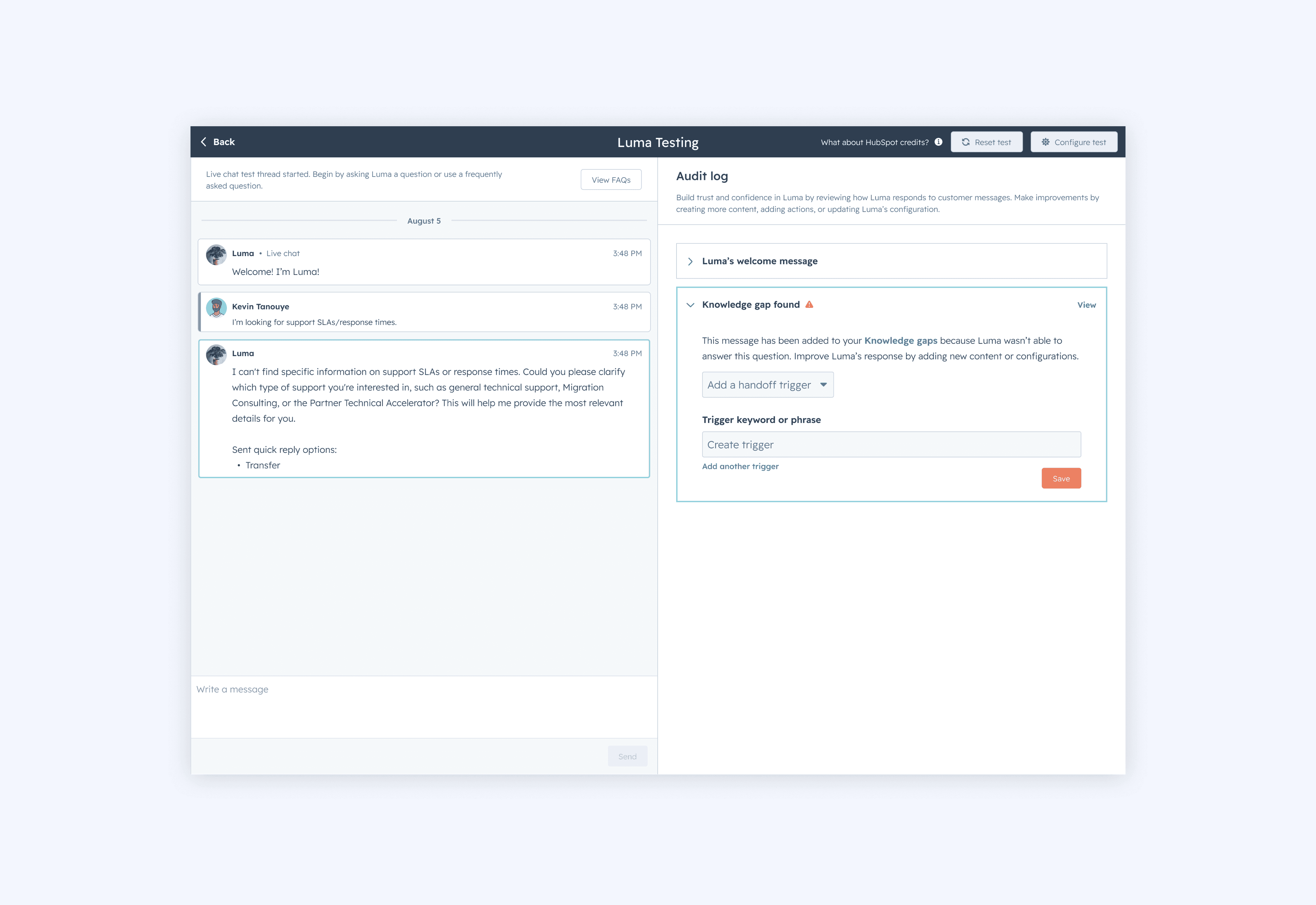
This screen explores different ways a user could resolve a Knowledge Gap. Creating a short answer was our primary solution, so we defaulted to that, but we also wanted to surface additional options alongside it. As part of this work, we recognized that the existing Knowledge Gap experience would also need to be updated to account for these new options.
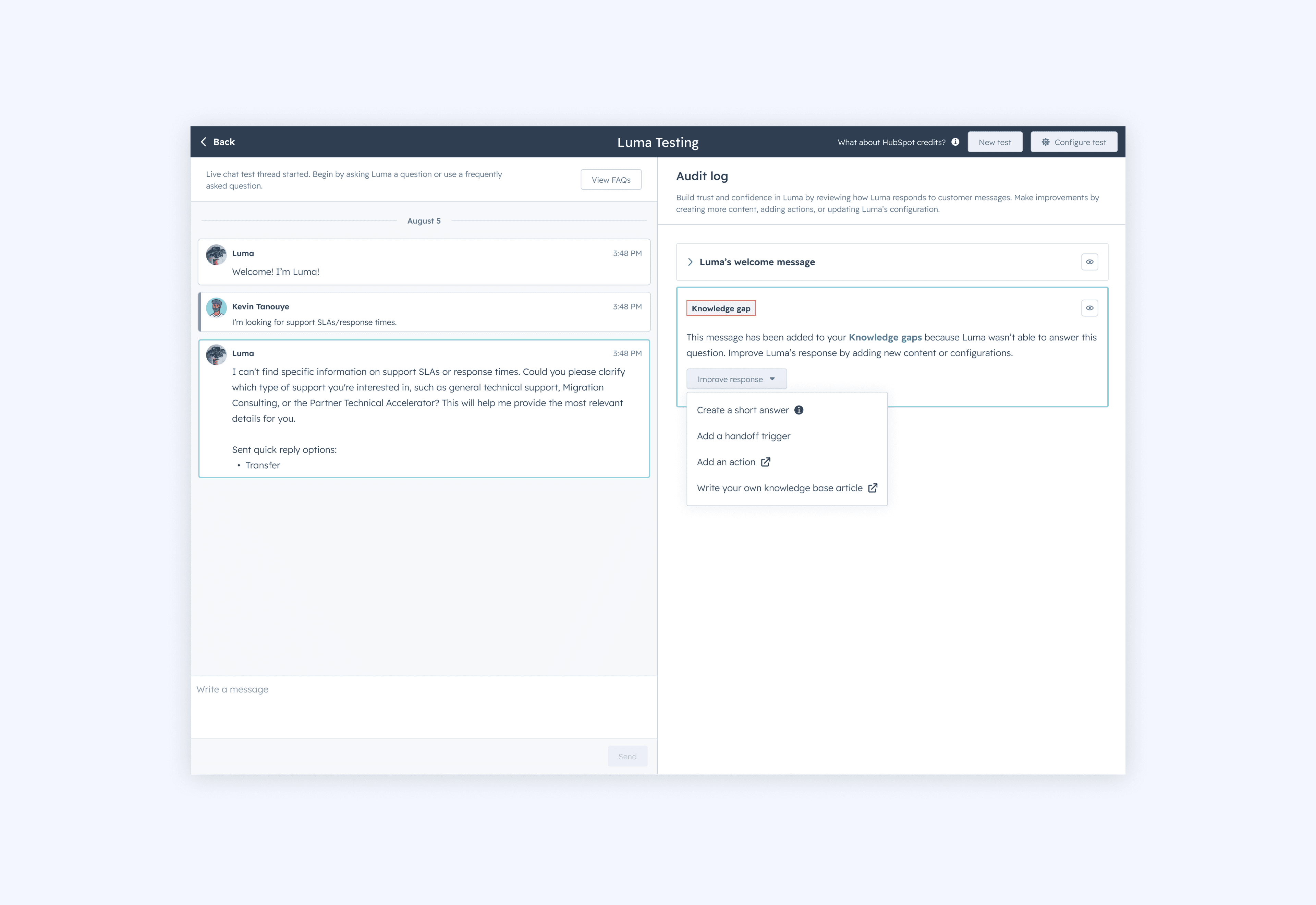
This screen explores the short answer creation flow, which is the most common way to resolve a Knowledge Gap. It's a straightforward experience with two form fields, one for the question (the trigger) and one for the answer.
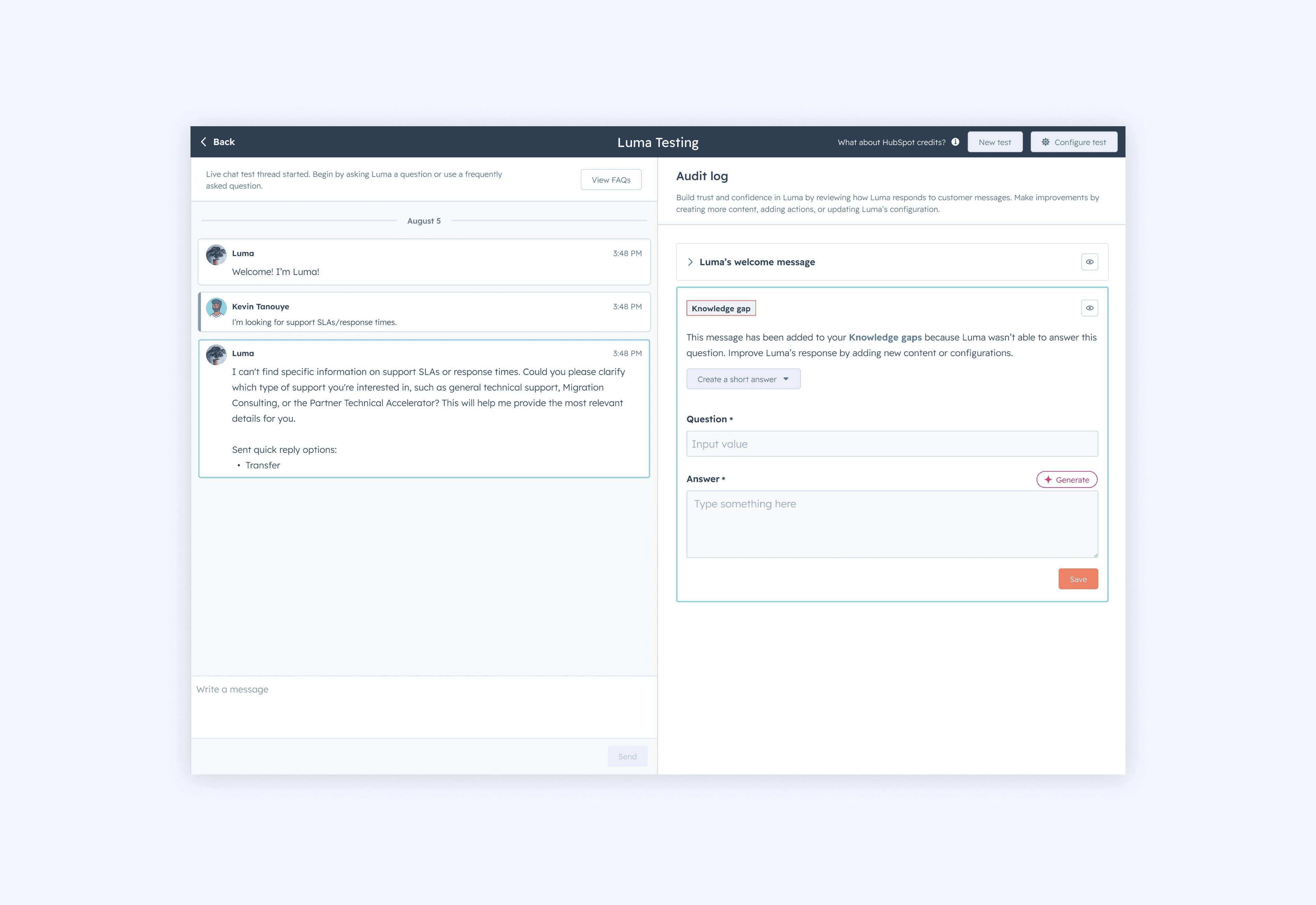
Trellis & UX updates
Around this time, HubSpot was going through a rebrand and building out a new design system called Trellis. This phase of work required updating our designs to reflect those new guidelines, which added another challenge since the guidelines weren't fully finalized, and changing everyday (yay 😭). Finding the right colors was particularly tricky, as the semantic options didn't always look great. Alongside these larger visual design changes, we also shifted the design to better reflect the end user's experience rather than the HubSpot user's perspective. The chat widget would give users a better sense of what their customers would be going through when interacting with the Customer Agent. You can also see some of the visual refinements that came with Trellis, like the updated corner radius on the cards and refreshed tags.
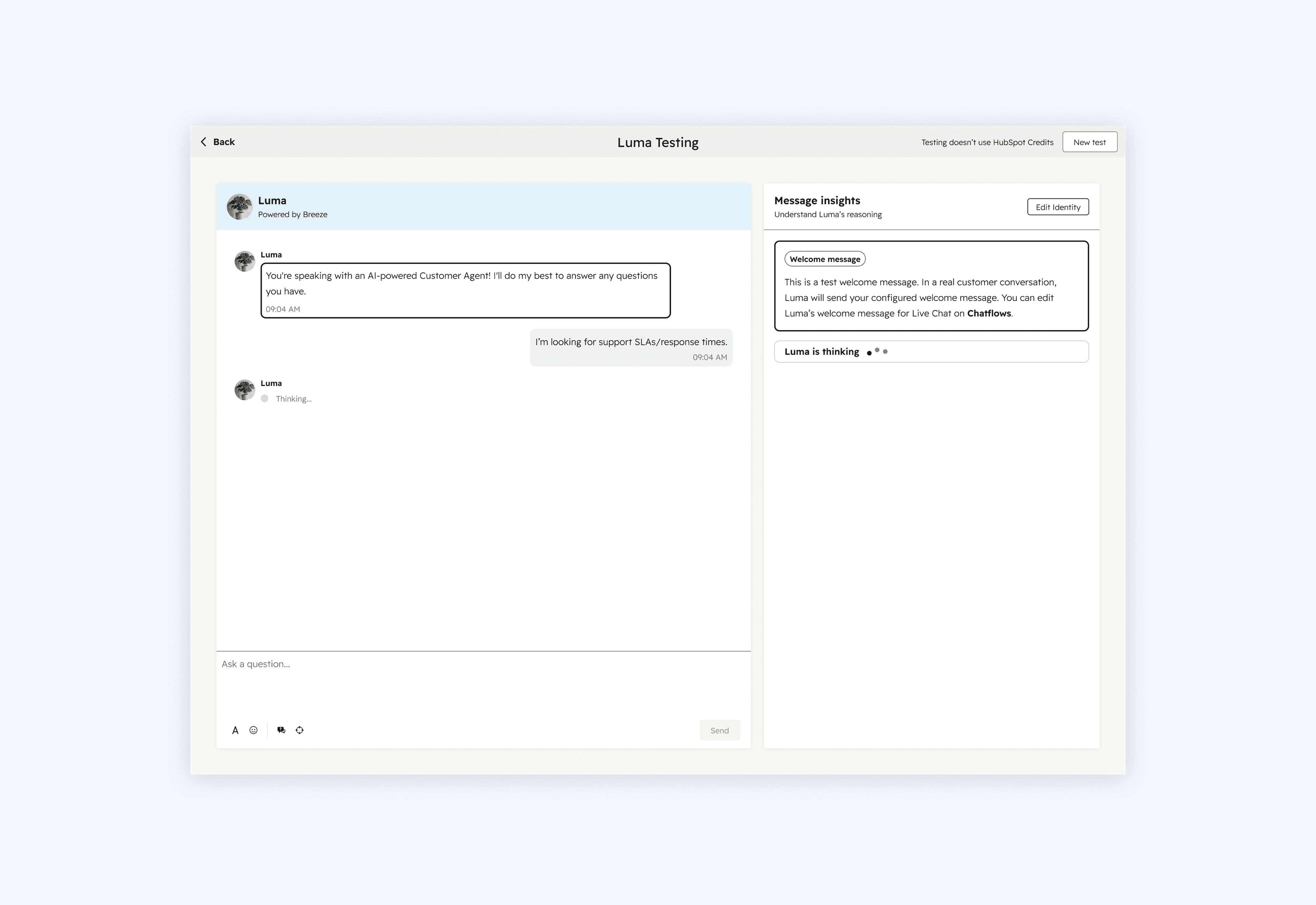
In this design, we incorporated test questions directly into the footer of the reply editor, giving users a quick way to select frequently asked questions from their Help Desk.
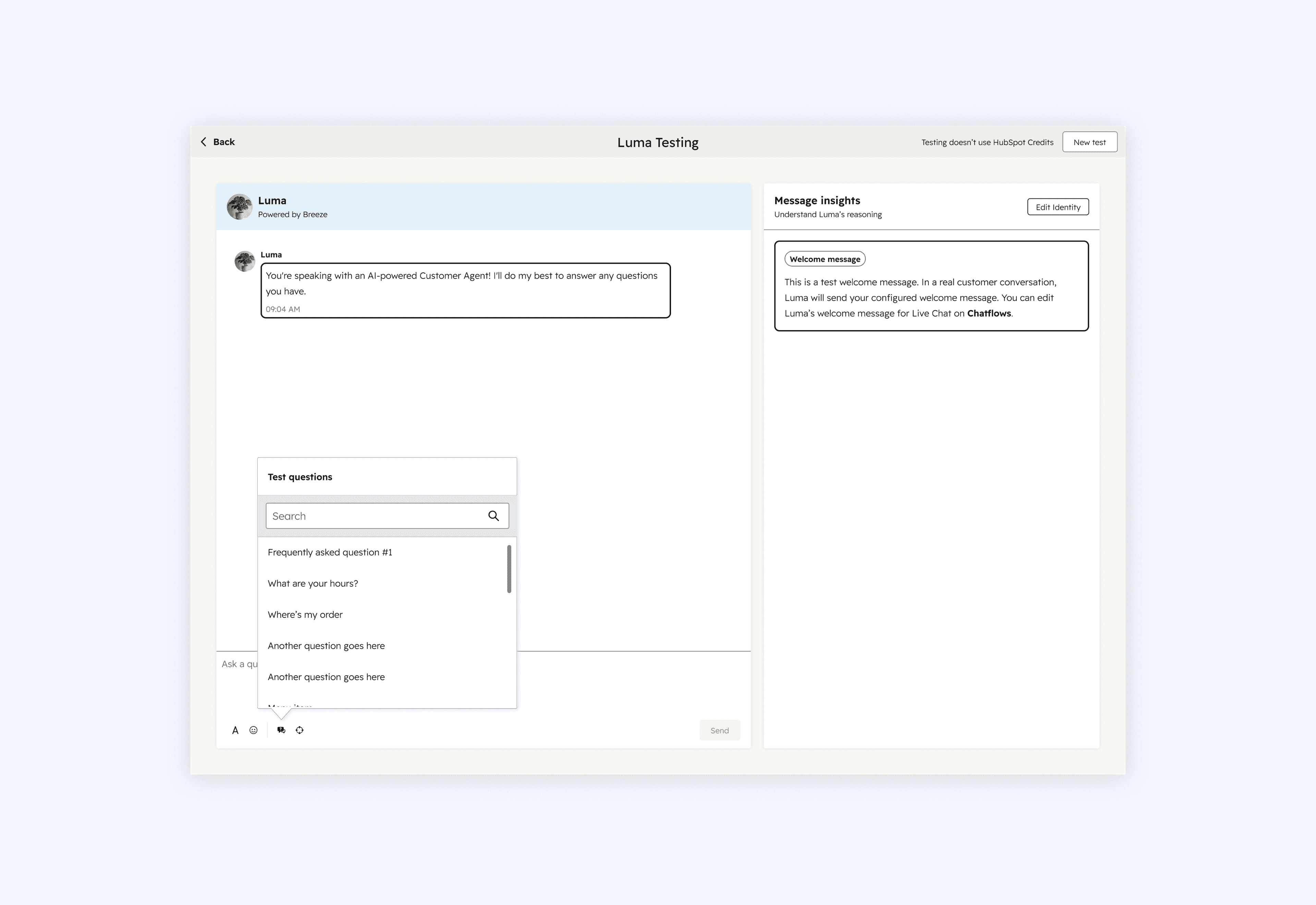
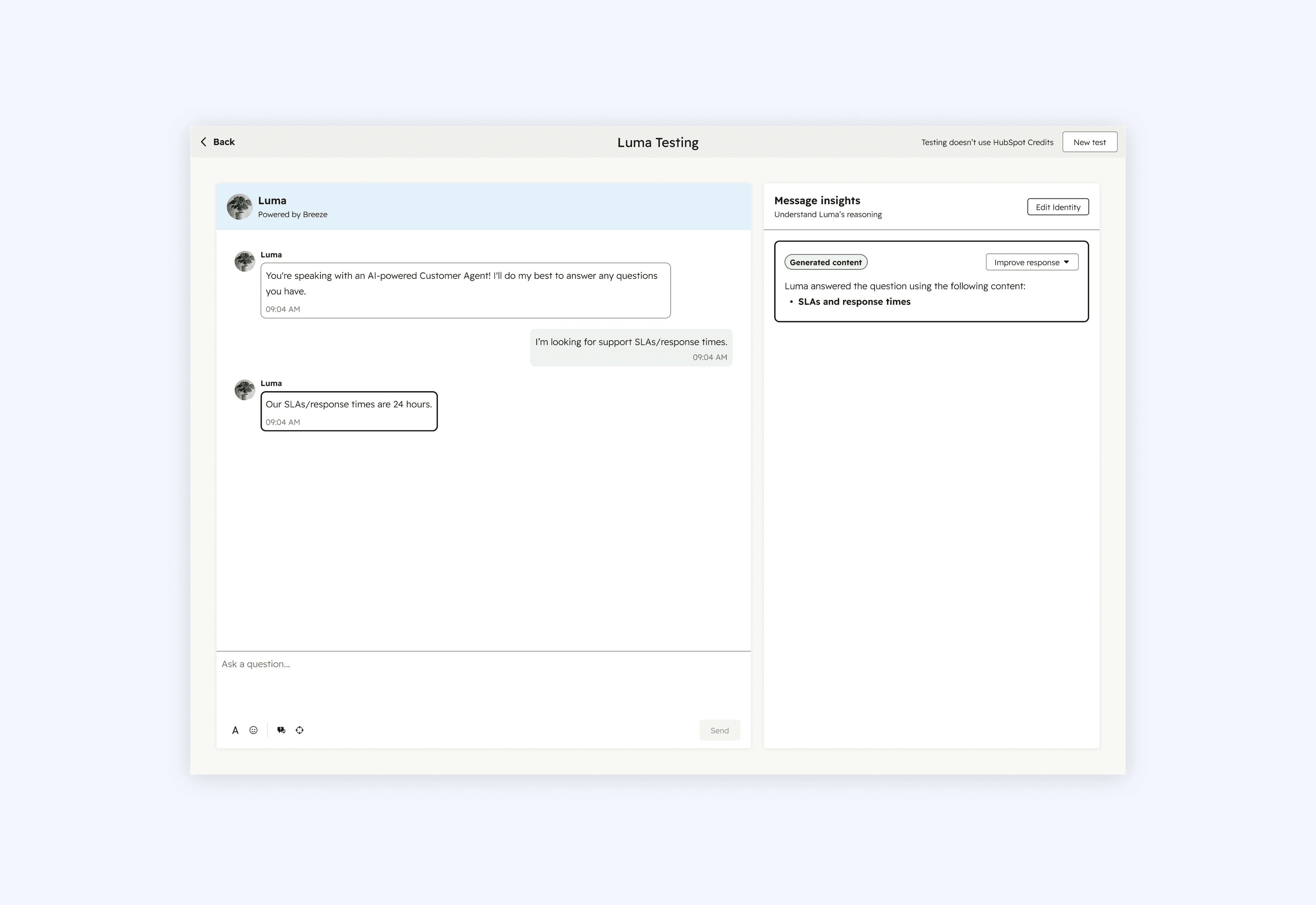
This design was getting pretty close to the final solution. One key change here is that we moved away from the audit log style design and shifted to only showing message insights for a selected message. Showing multiple insight cards at once was overwhelming and having users navigate between clicking messages on the left and viewing insights on the right created a jarring back and forth experience. Focusing on one message at a time made the experience feel more manageable and intentional.
One other notable change was the removal of the welcome message insights card, which had appeared in earlier designs. This came out of stakeholder feedback but our entire coaching team disagreed. The card was there for an important reason: we had to spin up a fake live chat instance to test the Customer Agent because we couldn't yet preview a specific live chat instance. This meant we couldn't show their configured live chat welcome message which is an important part of the live chat experience. This welcome message insight card was our way of communicating that to users so they wouldn't be caught off guard. Without it, we assumed users would be confused and either think something was wrong with their live chat instance or their Customer Agent, eroding trust in the Customer Agent. This is exactly what happened 😔. If I had framed it from a systems perspective to stakeholders, explaining that we had broken part of the system and the card was how we accounted for that, I think they would have understood why it needed to stay. Instead I only focused on the user perspective which wasn't enough in this case.
Solution
Back to the three R's
Throughout our research, risk, refinement, and reasoning came up over and over again. The three R's made users hesitant to deploy their Customer Agent. Users wanted to feel confident in how their agent would respond, and they wanted the ability to fix things before going live. The solution we landed on addresses exactly that. It's built around those three R's: reducing the risk of deployment, giving users the tools to refine their agent, and making the agent's reasoning transparent so users can actually understand why it responded the way it did. I'll walk you through a couple flows 💃🏻.
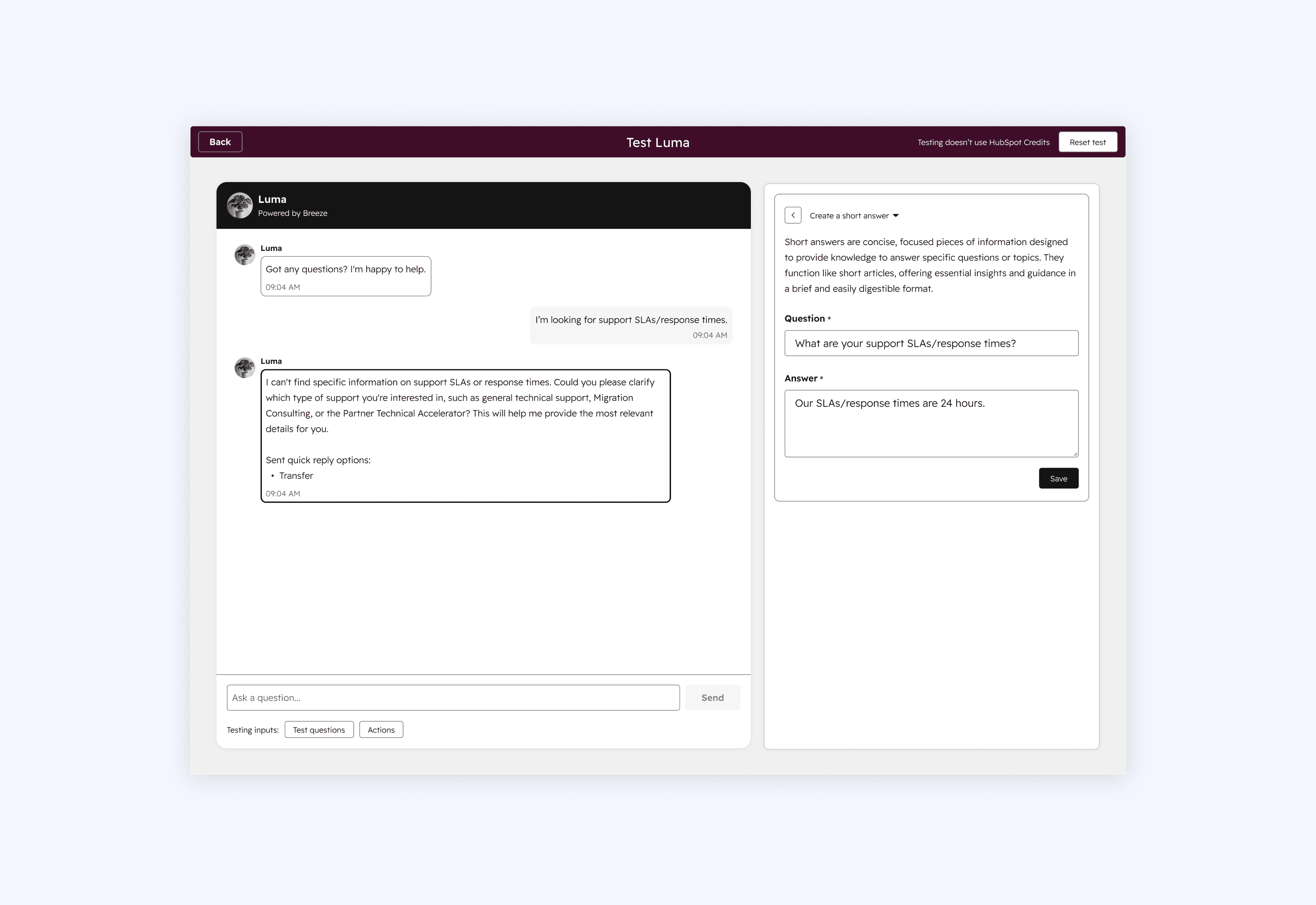
Flow 1: Resolving a Knowledge Gap
The first flow is around resolving a Knowledge Gap. As mentioned, a Knowledge Gap occurs when the agent can't answer a customer's question. Previously, users would only discover these after deploying. We brought Knowledge Gaps into the pre-deployment experience so users can catch and resolve them while testing, before any end customer sees them. It's important to note Knowledge Gaps that appear in the tester do not appear in the larger Knowledge Gaps feature as this would be confusing and affect data insights (like resolution rate).
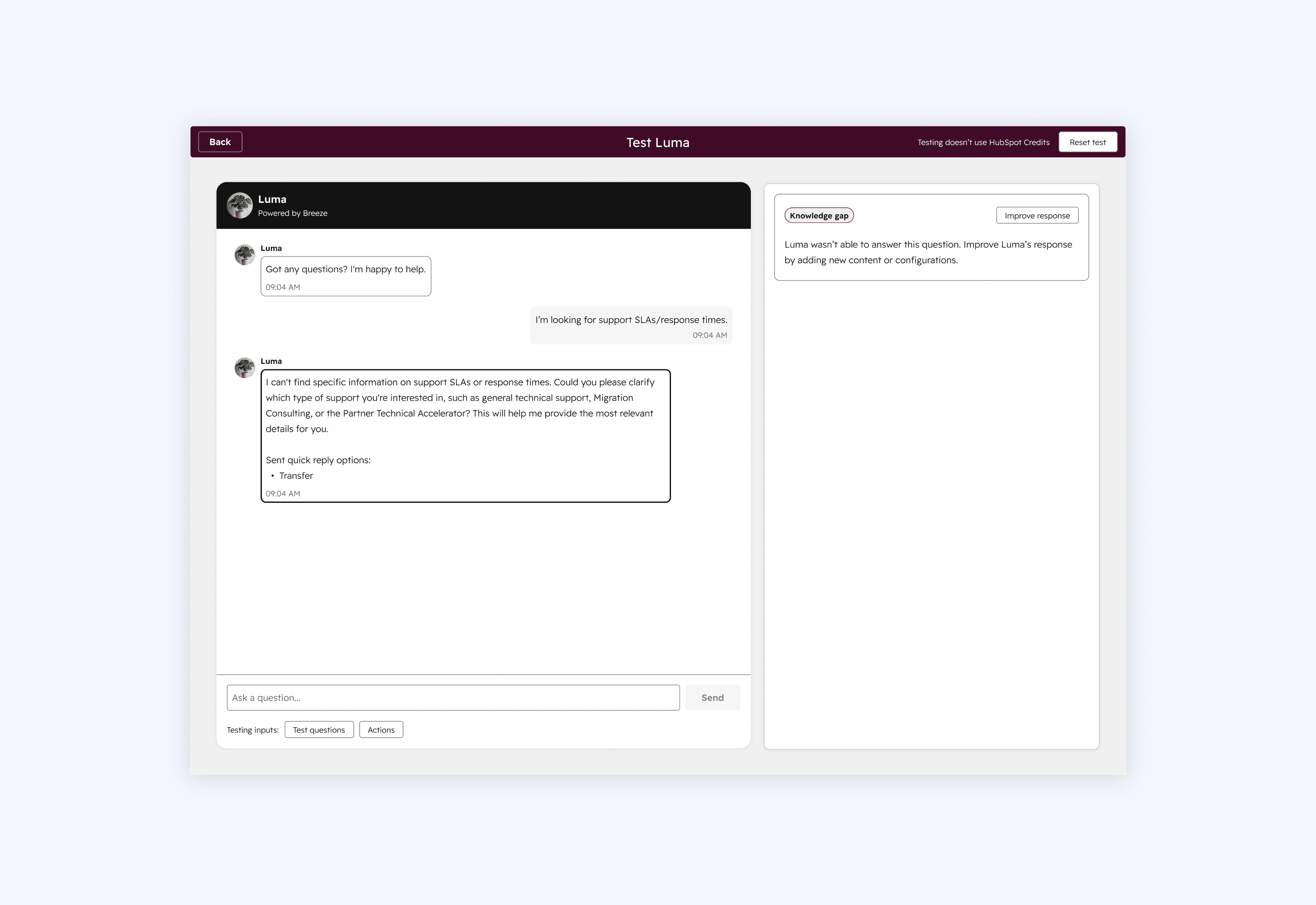
When a user clicks "Improve response," we default to the "Create a short answer" option, where they can quickly fill in an answer to the question that triggered the Knowledge Gap and save it. These short answers would appear in the Customer Agent's content sources along with the rest of the content powering the agent. Because we made adjustments to this experience in the tester, we also went back and updated the larger Knowledge Gaps feature that appears post-deployment (2nd screenshot) to better align with what users would see in the tester, keeping the two experiences consistent.
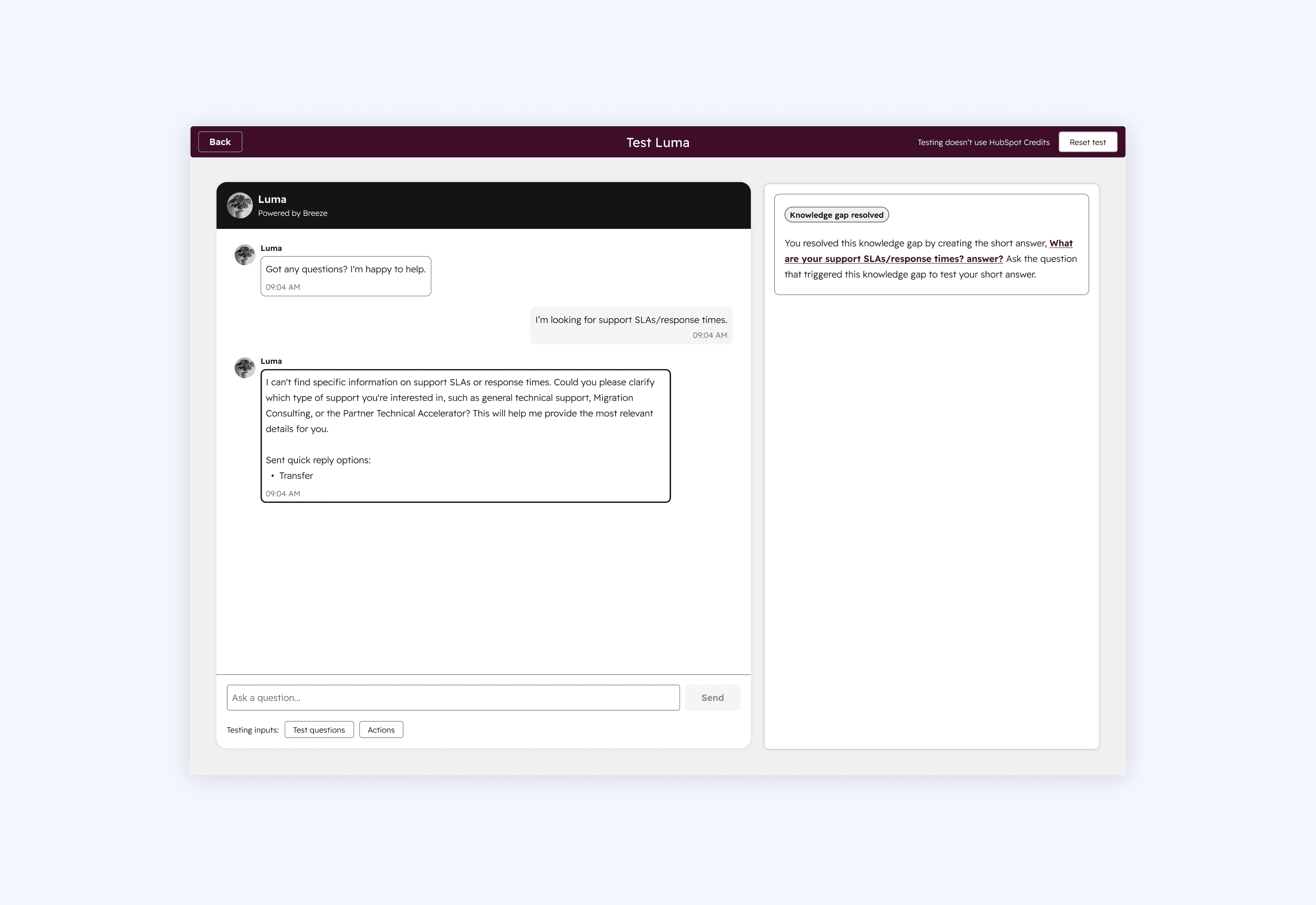
This design shows the Knowledge Gap in its fully resolved state, where the user can click into the agent's response and see exactly what was updated. We wanted to include a quick way for users to re-ask the question that originally triggered the Knowledge Gap directly within this flow, but we weren't able to get to that in this phase of work.
Flow 2: Refining a correct response
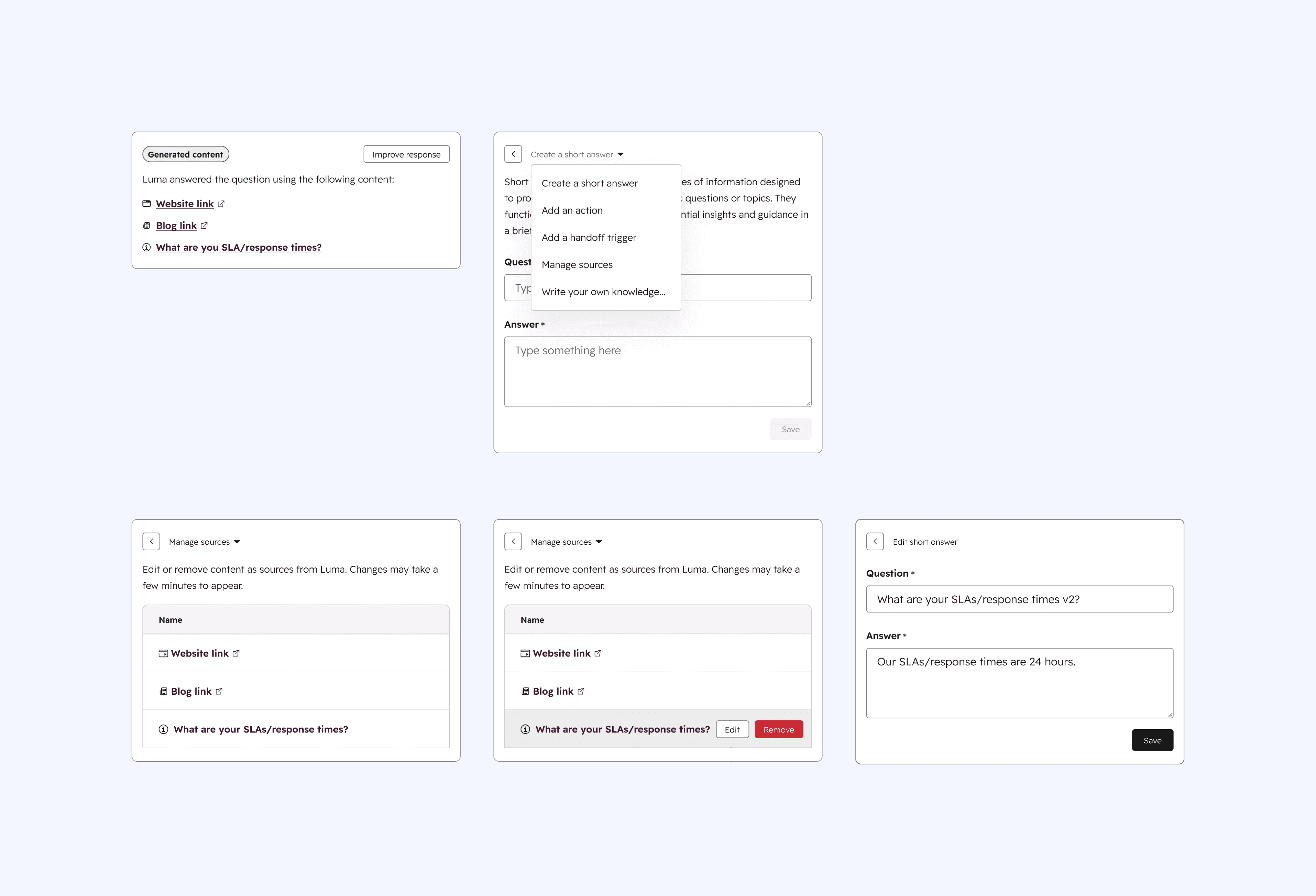
The second flow is about taking a response that's already correct and making it even better. Just because the agent answered correctly doesn't mean the response couldn't be improved. This flow gives users a way to fine-tune responses and feel more confident in the quality of their agent's responses. Once a user clicks "Improve response," we default to creating a short answer, but they also have the option to click into "Manage sources" to edit or remove existing sources. This matters because the Customer Agent is only as good as the content it's trained on, making source management one of the most impactful ways to improve an already correct response. For editing a short answer, we kept the experience intentionally simple, giving users a straightforward way to edit directly. Users can also navigate to their other knowledge sources to make updates.
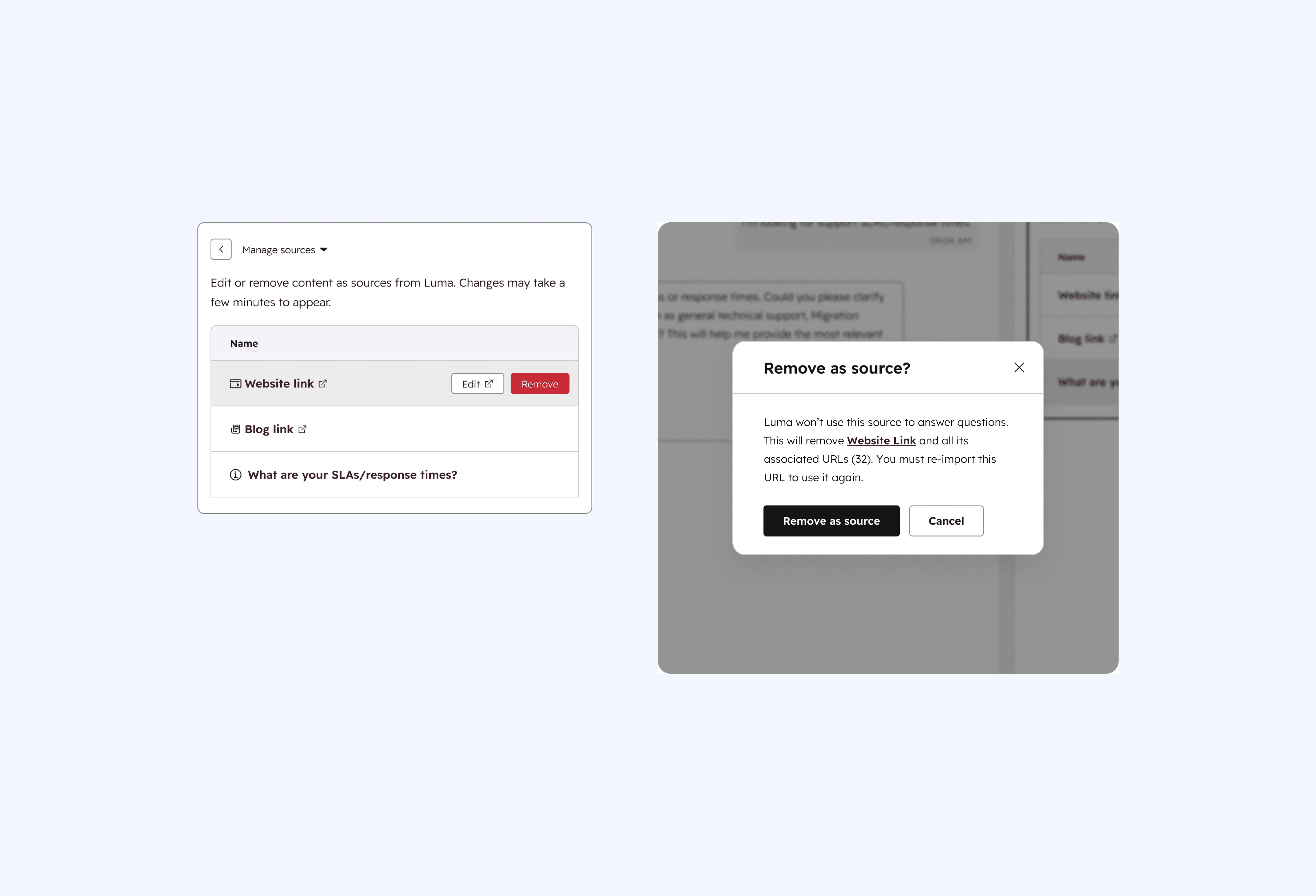
Removing a source was one of the trickier design problems in this flow. The challenge is that removing a source from a response actually removes it from the entire Customer Agent, not just from that one response. My product manager (well, former product manager's boss) and I went back and forth on this. Ideally, we would have navigated users to the content sources page to handle the removal there, as that would capture the gravity of the change and match the user's mental model of where to adjust the agent's knowledge sources. But there was an argument to keep the experience quick and lightweight, so we landed on the modal below. The modal makes it clear the source would no longer be used by the Customer Agent to answer any questions. In hindsight, I should have made the "Remove as source" button red to better signal the weight of that action.
Scalable system
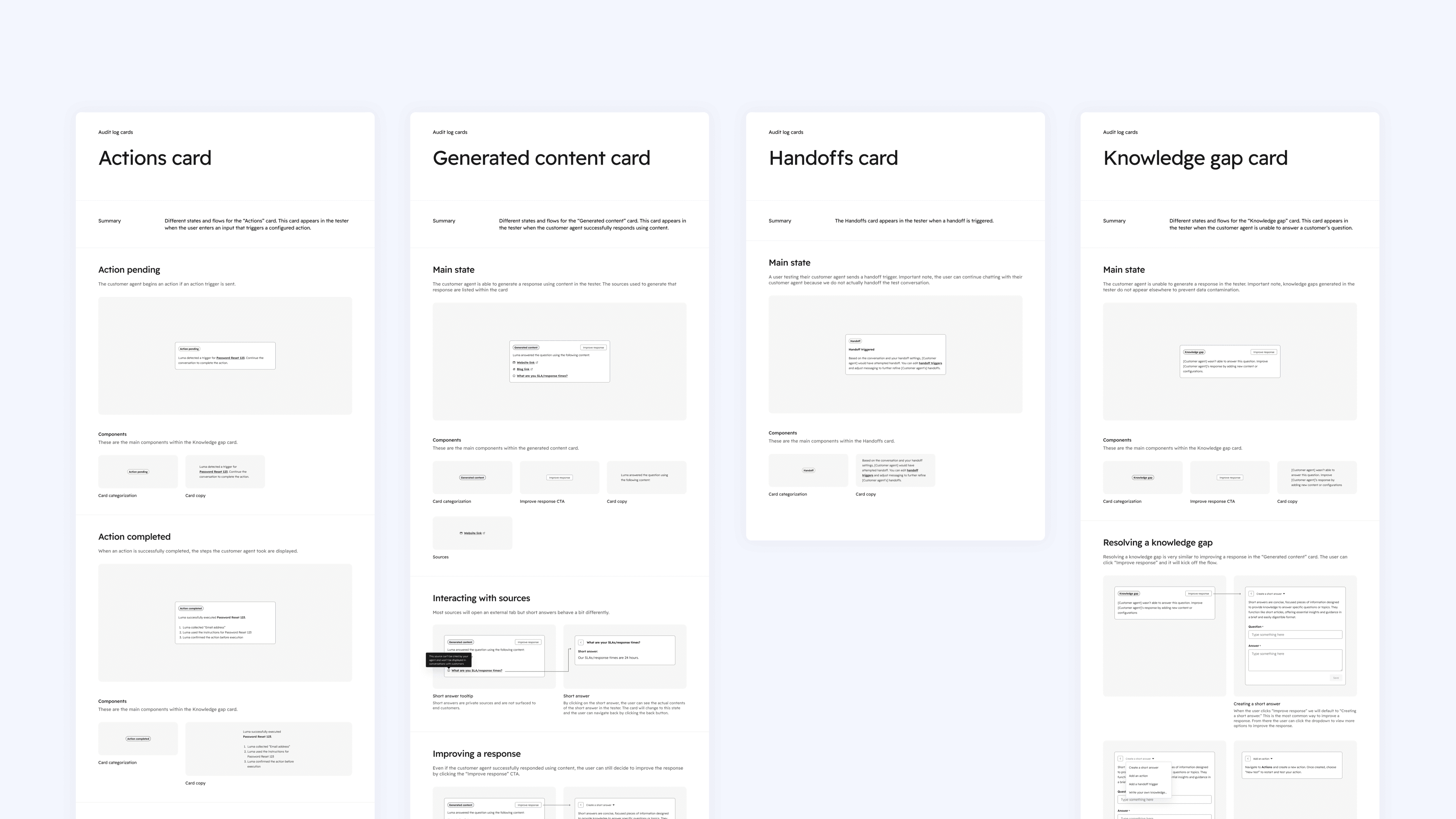
Rather than designing a separate interface for every type of insight, I created a shared pattern through a system cards. Each card follows the same structure but surfaces different information depending on what the agent did, whether that was generating content from a source, detecting an action trigger, initiating a handoff, or flagging a knowledge gap. This design made the insight layer scalable, so as new Customer Agent features are built out, new cards can slot right in without having to rethink the design from scratch.
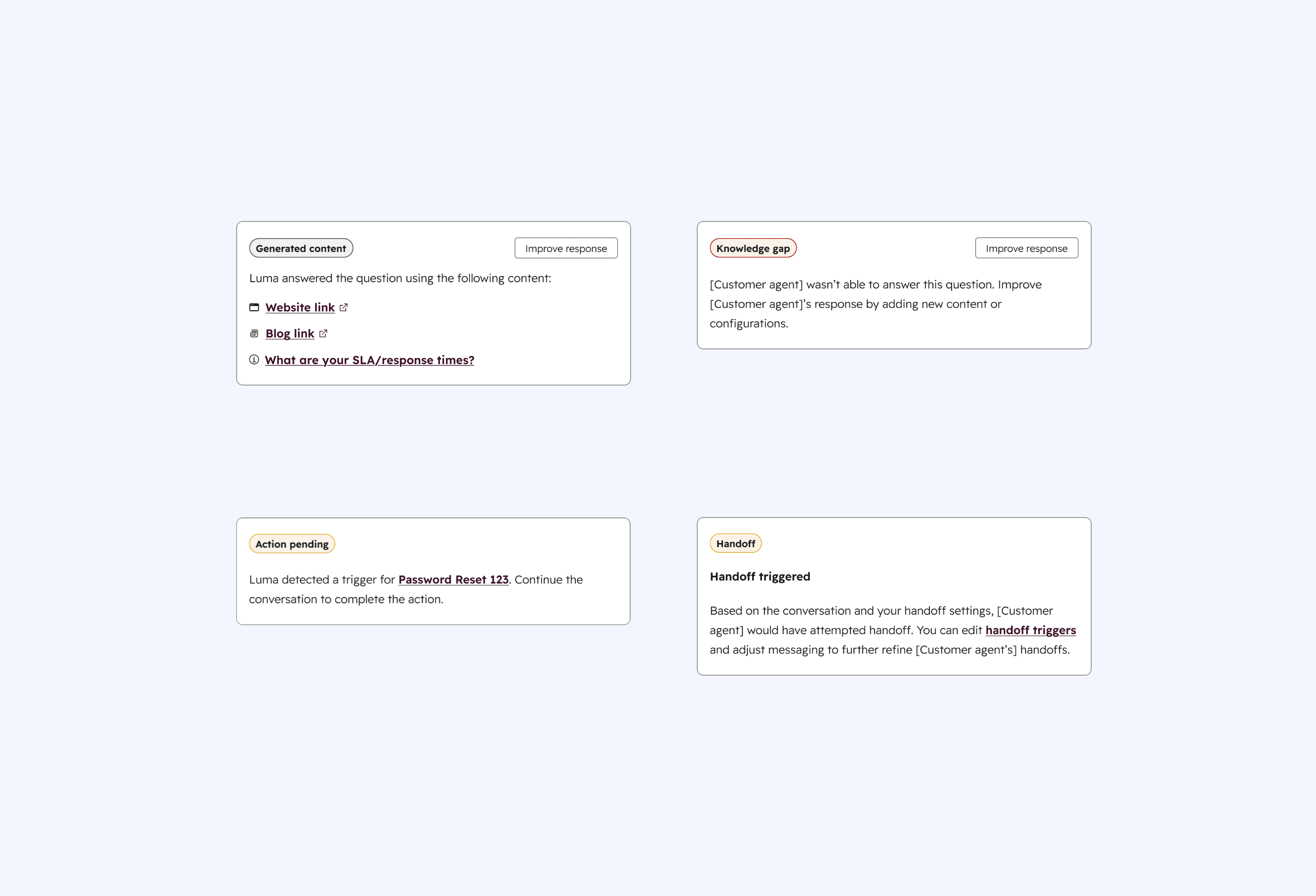
These screenshots show the documentation I put together for the different types of message insights cards. It was designed for the broader team to reference and to help engineers and designers understand how each card was structured and when it would appear.
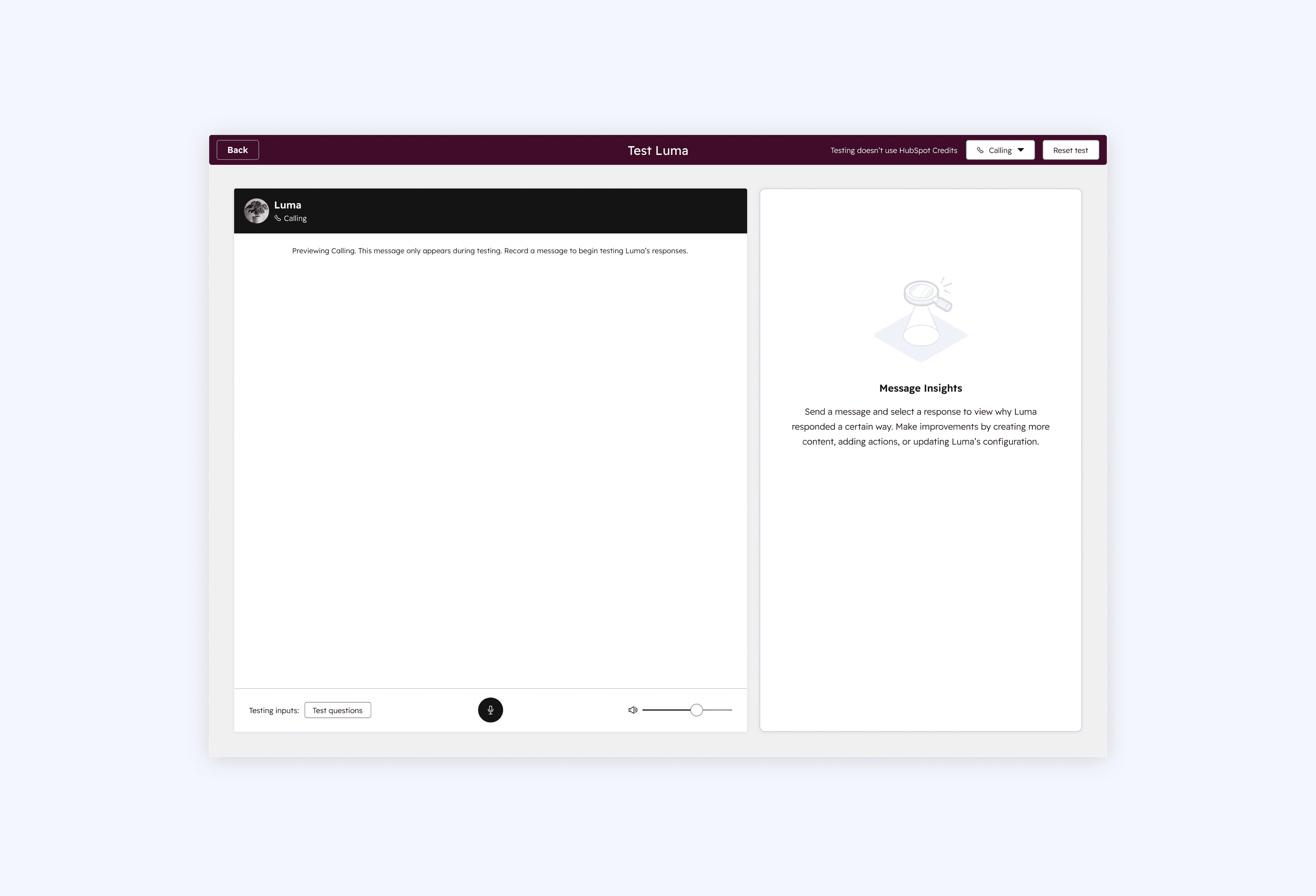
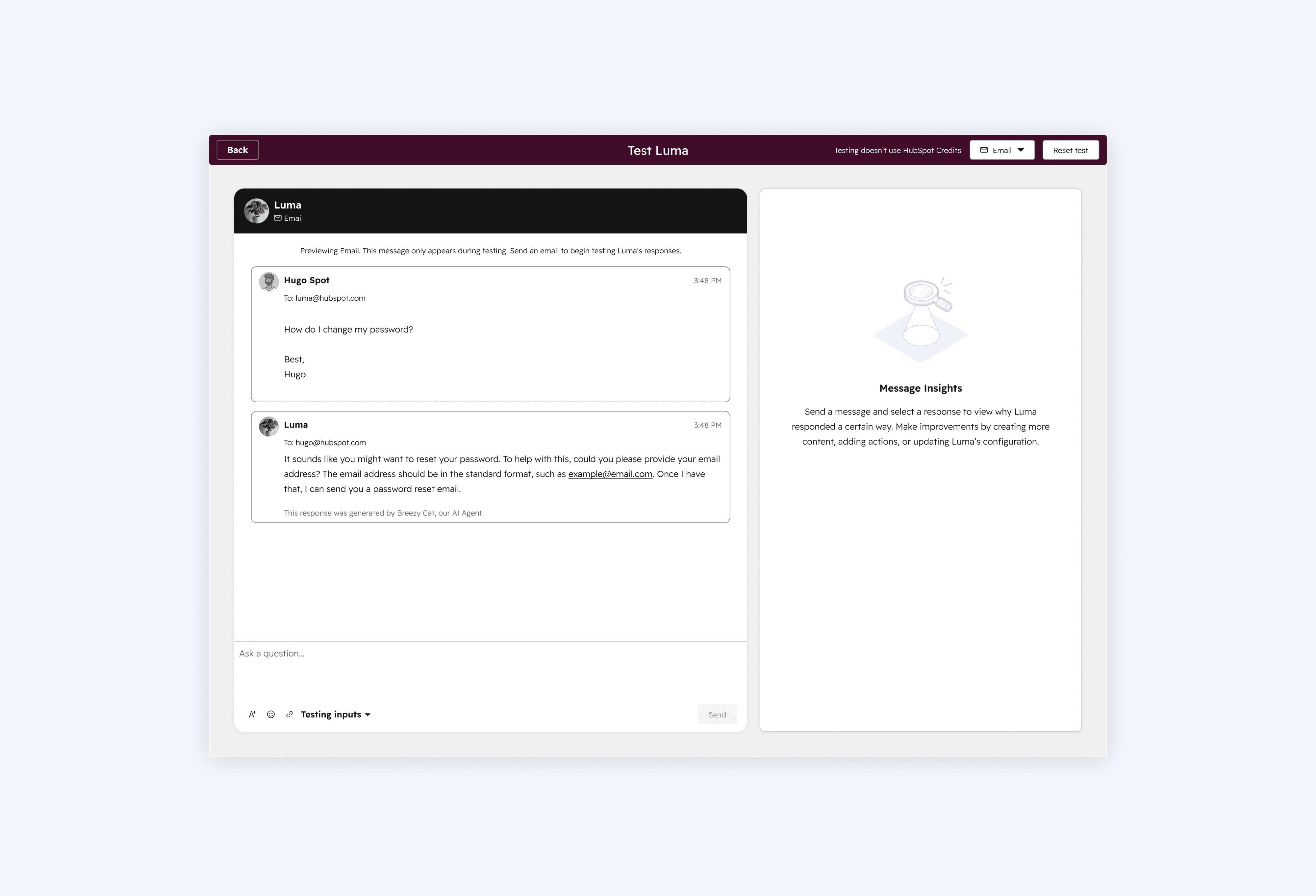
Thinking ahead
The screens below explore some future thinking around the calling and email channels, two of the most requested features from users. While the Calling team and Customer Agent growth team weren't quite there yet, it was important for me to get ahead and explore how these channels could be incorporated into the tester once they were ready.
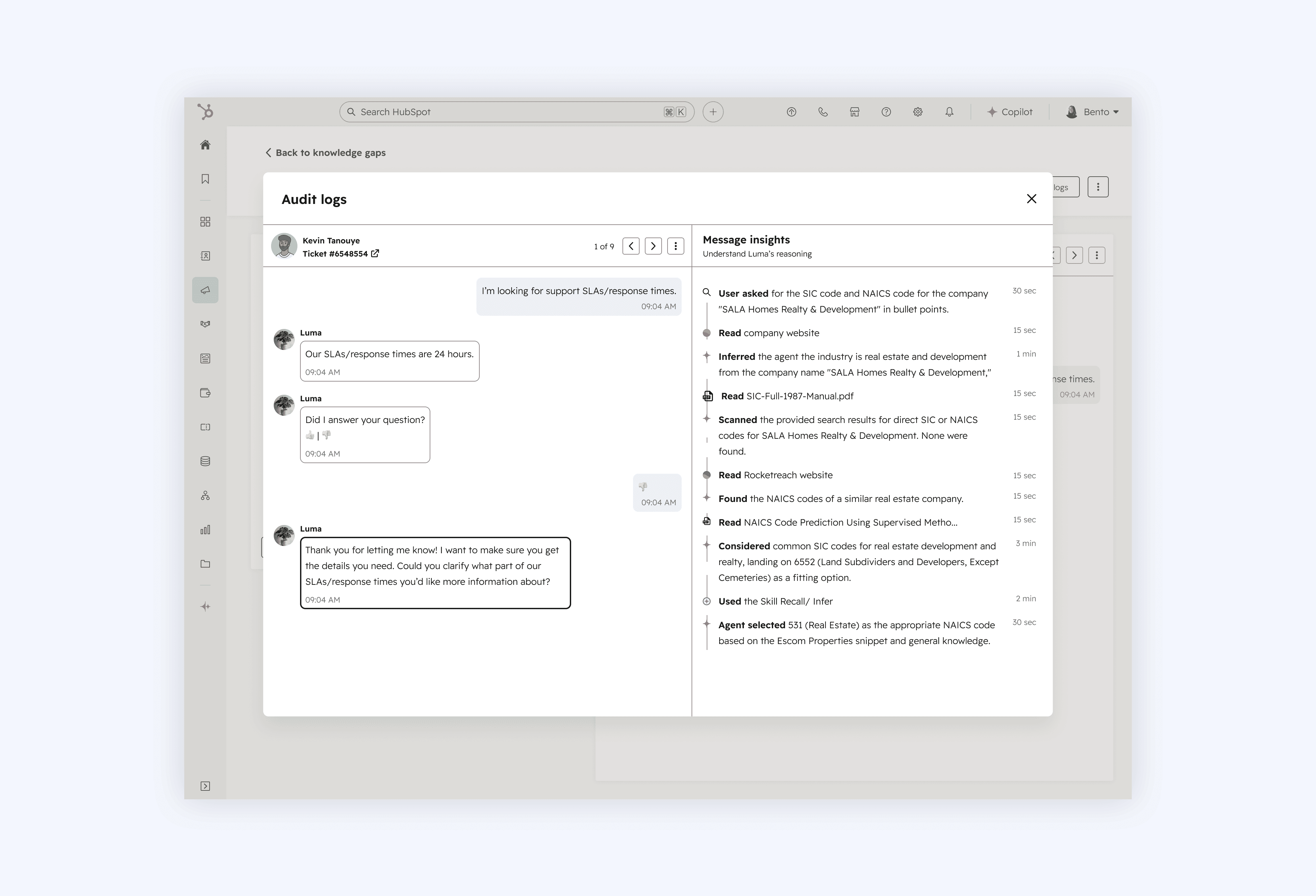
Another future feature we explored was surfacing an "Agent Reasoning" component into the tester. This was separate from the tester and something the Breeze AI team was actively working on for the larger Breeze AI feature. They had started showing agent reasoning in a different part of the platform and I worked closely with their designer to see how we could bring that component into the tester experience. The screen below shows that exploration, including how the message insights card could be incorporated alongside the agent reasoning view.
Another direction I explored was giving customer service reps the ability to manually flag the Customer Agent's responses. This screen shows what that could look like, with the agent reasoning component incorporated into the design as well. The idea here was to take the message insights panel out of the testing environment and bring it into an actual live conversation between the Customer Agent and an end customer. We could begin bringing our Customer Agent coaching feedback loop in!
Conclusion
Impact & outcomes
The Customer Agent Tester was designed to address a key barrier: users’ lack of confidence in their Customer Agent prior to rollout. While overall adoption of the Customer Agent is influenced by many factors, the engagement data from the tester provides clear signals that users were actively refining and improving their agents.
Within the first 4 months of launch (July [Alpha release] - October 2025):
The "Improve response" button was clicked 6,717 times, showing frequent refinement activity.
2,300 short answers were created, transforming Knowledge Gaps into reusable responses and 43 existing short answers were edited.
240 handoff triggers were executed, enabling users to test escalation flows in context.
~ 18 sources were removed, meaning users were refining their knowledge sources and keeping them up to date.
These metrics demonstrate that users actively engaged with the Customer Agent Tester, iteratively testing and refining responses, which aligns with the user goal of building confidence pre-deployment. By addressing the three R's, the testing experience helped teams make informed deployment decisions, reduced the friction around rollout, and set the foundation for broader Customer Agent adoption in the future.
Scalability of short answers?
One thing worth calling out is the role of short answers in this project. In the current implementation, short answers felt like they sat outside of the HubSpot knowledge sources system rather than being a true part of it. More honestly, they felt like a band aid solution for adding knowledge to the Customer Agent. Unlike other knowledge source types, such as HubSpot knowledge base articles which come with rich metadata like authorship and last updated dates, short answers didn't carry that same information. That gap makes it difficult to search for short answers, track who made a change to a short answer, when it was made, and audit those changes over time. Imagine a user with 1,000 short answers that now needs to update those short answers. How would they even begin updating and editing all those?
There are a couple of directions I think could solve this. The simplest would be adding that missing metadata directly to short answers, though I'm not sure how feasible that would have been technically. The other direction I started exploring came out of a conversation with a former product manager of mine from my time on the Reply Enablement team. She had since moved to the knowledge base team and was working on a new feature called the knowledge base agent, an AI tool that helps users quickly spin up knowledge base articles. I saw an opportunity to connect that feature to short answers, essentially using it to convert short answers into full knowledge base articles instead. That way, what used to be a lightweight band aid solution would now carry all the metadata and structure that comes with a proper knowledge base article, making changes trackable, attributable, and far easier to manage over time. Unfortunately, the knowledge base team was in the middle of a significant migration that wasn't going smoothly, so our plans to take this idea further were put on hold before we could make any real progress on it.
What I learned
One thing I'd do differently is take more time to explain the Help Desk system to our new AI stakeholders. My team and I came from a Help Desk and ServiceHub background, so we knew the product inside and out. But many of the stakeholders in the newly formed AI group had never used Help Desk and didn't have a strong grasp of its use cases or how customers actually worked within it. When I'd reference the Help Desk user experience to justify certain design decisions, I assumed there was a shared baseline understanding, but that wasn't the case. I should have done a better job walking stakeholders through the why behind those decisions and grounding them in the Help Desk user experience and system first. It was a good learning moment for me. Moving between product groups means tribal knowledge doesn't carry over the way you think it will, and as a designer, it's on me to bridge that gap. If I had done a better job of this, we could have avoided a lot of confusing user feedback down the line, like what happened with the welcome message.
Reflection
Looking back, I'm really proud of what my team and I were able to deliver in such a short time and in a brand new space. We designed an experience that helped users feel confident deploying their Customer Agent by addressing the three Rs: risk, refinement, and reasoning. Beyond that, we introduced a scalable system that allows the tester to grow as new Customer Agent features come online, and we laid the groundwork for the broader Customer Agent coaching mission the team will continue to build on.
Thank you
If you've made it this far, thank you so much for reading this insanely long case study, I hope you enjoyed it much more than I did writing it 😵💫.
© 2026 Kevin Tanouye